Case study
Reviews section case study: moving product reviews up the page lifted orders 42.38% on mobile
This reviews section case study ran the same test on two US online stores, one selling premium bedding and one selling beaded bracelets. Both had customer reviews at the very bottom of the product page. Convertica moved the reviews up, just below the product, and A/B tested it on mobile and desktop.

Reviews section case study at a glance
| Clients | Two US online stores: premium bedding designed in the US, and beaded bracelets shipped worldwide (names not published) |
|---|---|
| Vertical | eCommerce |
| Goal | More trust on the product page, and more orders |
| Page tested | Product pages |
| Change tested | Reviews moved from the very bottom to just below the product |
| Test | A/B test on mobile and desktop, 2 weeks, 50/50 split, 98% confidence |
+42.38%
Orders (orders per visitor), bedding store, mobile, 2-week A/B test
Source: US bedding store, product page A/B test, mobile, 50/50 split, 98% confidence
Who were the clients?
The test ran on two US online stores. The first is a niche bedding store selling premium bedding designed in the United States. The second is a jewelry store specializing in beaded bracelets, based in the United States and shipping worldwide. The original case study does not name either store.
Where were the reviews?
On both stores, customer reviews sat at the very bottom of the product page. A shopper had to scroll past the product images, the description, the features and the recommended products before seeing what other buyers thought. Many shoppers never scroll that far, so the strongest proof on the page went unseen by the people who needed it.
What was the hypothesis?
The hypothesis was that showing reviews earlier on the product page, where shoppers could see them more readily, would increase trust and so increase orders. Reviews answer the question a first-time buyer has about a product they cannot touch: did other people like it? Placing that answer before the long description, rather than after it, should help more shoppers decide.
What changed on the product page?
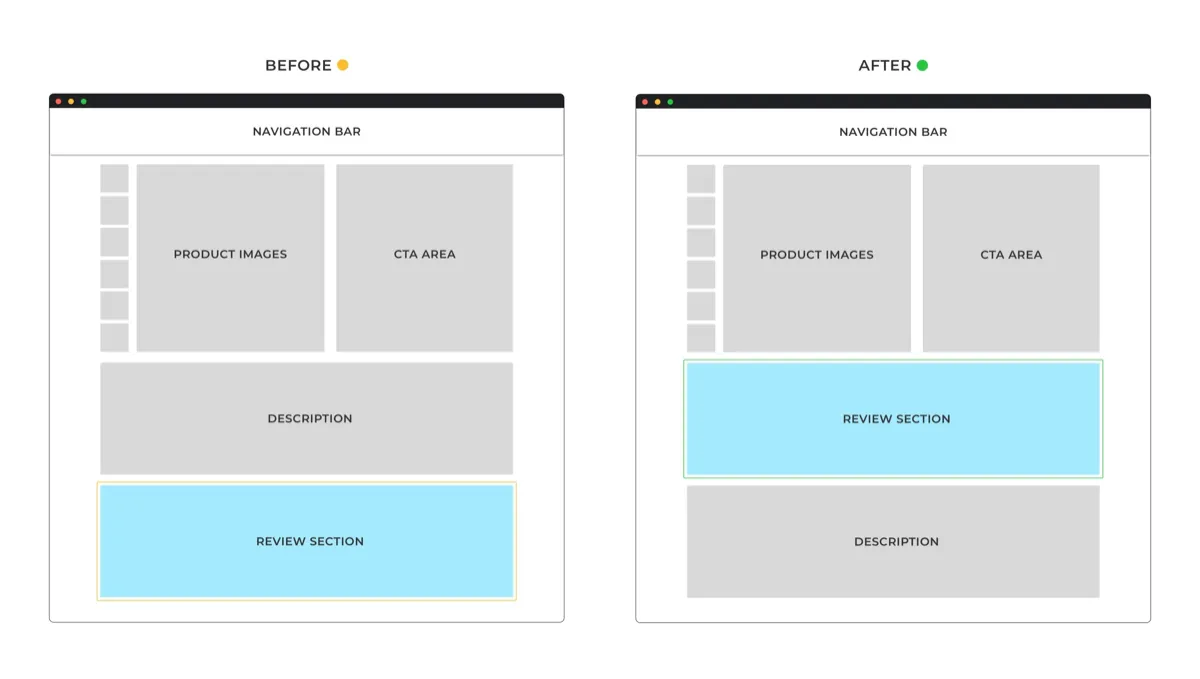
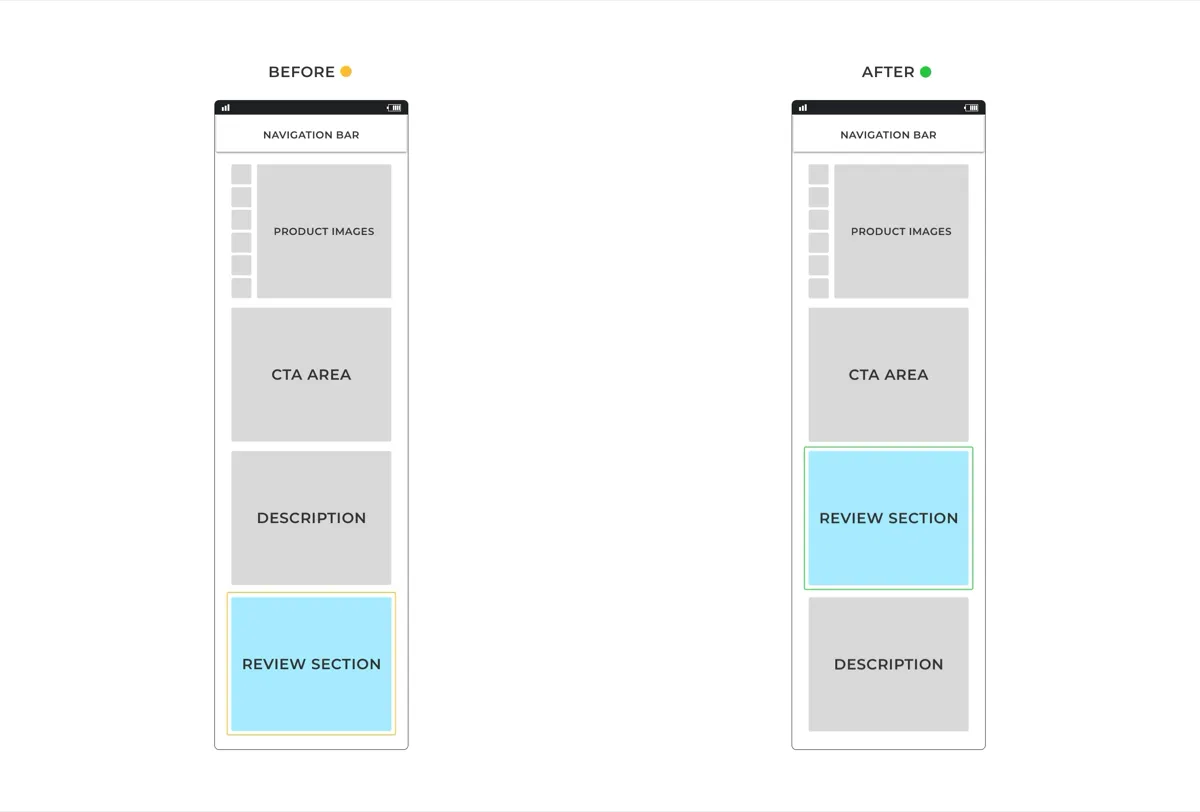
The test version moved the reviews section up the product page on both stores, on mobile and desktop. Nothing else changed:
- Before. Product images and the buying area, then the description and features, with the reviews at the very bottom.
- After. Product images and the buying area, then the reviews, just under the fold. The reviews sat above the product comparison, the detailed description and features, and the recommended products.
How was the reviews section test run?
The reviews section test was an A/B test of the original product page against the version with reviews moved up, run on both stores, on mobile and desktop. Traffic was split 50/50 between the two versions, and the tests ran for 2 weeks to reach a 98% confidence level. Conversions were measured as orders per visitor, with revenue per visitor and the funnel steps alongside.
| Test type | A/B test on each store, control vs reviews moved up |
|---|---|
| Stores | A US bedding store and a US jewelry store |
| Devices | Mobile and desktop, reported separately |
| Traffic split | 50/50 |
| Duration | 2 weeks |
| Confidence reached | 98% |
| Main measure | Conversions (orders per visitor), with revenue per visitor and funnel steps |
What were the results?
The repositioned reviews section won on both sites, but on one device each. The bedding store gained on mobile only, with orders up 42.38%. The jewelry store gained on desktop only, with completed orders up 20.34%. On each winning device, every step of the funnel improved, and revenue per visitor moved in line with the funnel.
+42.38%
Orders (orders per visitor), bedding store, mobile, 2-week A/B test
Source: US bedding store, product page A/B test, mobile, 50/50 split, 98% confidence
+20.34%
Completed orders (orders per visitor), jewelry store, desktop, 2-week A/B test
Source: US jewelry store, product page A/B test, desktop, 50/50 split, 98% confidence
| Store | Winning device | Orders per visitor | Funnel steps that improved |
|---|---|---|---|
| Bedding store | Mobile only | +42.38% | To the cart, to checkout, purchase completed |
| Jewelry store | Desktop only | +20.34% | Add to cart, checkout, thank you page reached |
The original case study also gives a site-wide view for a desktop-only rollout: the total impact would be a 2.9% increase in the rate of order completion and a 2.2% increase in revenue per visitor. It reads as a projection for the jewelry store, whose desktop visitors are only part of its traffic, and the calculation is not published, so treat it as an estimate.
That smaller figure is a useful reminder. A large lift on one device becomes a smaller lift across the whole store, because the other device's visitors see no change.
Why did each store win on a different device?
The original case study does not explain why the bedding store won on mobile and the jewelry store on desktop. The two stores sell different products to different shoppers, and their product pages may differ in length and layout, so the same move may have put the reviews in a different place relative to what each shopper had already seen. Any of those could explain it; the test cannot say which.
What the result shows clearly is that the same change on two stores did not behave the same way. That is the strongest argument in this series for testing a change before rolling it out, even one that sounds like common sense.
Where should reviews go on a product page?
Reviews on a product page should sit where shoppers will see them while they are deciding, and in this test that was just below the product, just under the fold, before the long description and the recommended products. The bottom of the page, where both stores had them, is where many shoppers never reach.
You can test the same move on your own store in five steps:
- Get good reviews first. Moving reviews up only helps if they are worth reading. Few or mixed reviews will not build trust in a more visible spot.
- Check where your reviews sit now. Scroll your product page on a phone. If reviews come after the description, the features and the recommendations, most shoppers will not see them.
- Move them up, and change nothing else. Place them just below the product and buying area, above the long content.
- Test on mobile and desktop separately. Here each store won on one device only.
- Roll out only where it won. And estimate the site-wide effect honestly, as the original case study did.
Reviews also matter to AI shopping agents. An agent comparing products may read your rating and review text if they are in the page's HTML, and may miss them if they load later through a third-party script. Check that your reviews are readable in the page itself. Agent readiness is one of the eight checks in Convertica's free CRO audit.
For a trust test on the homepage, read the homepage trust signals case study. For another test that won on one device only, read the homewares CRO case study. To plan your own test, the A/B test sample size calculator shows how much traffic you need.
Reviews section case study FAQ
What did the reviews section case study test?
It tested where customer reviews sit on a product page. On two US online stores, a bedding store and a jewelry store, the reviews moved from the very bottom of the page to just below the product, above the product comparison, the detailed description and the recommended products. Each store's original page was the control.
How much did moving the reviews section increase orders?
On the bedding store, orders per visitor rose 42.38% on mobile. On the jewelry store, completed orders per visitor rose 20.34% on desktop. Both tests ran for 2 weeks with a 50/50 traffic split and reached a 98% confidence level. Each store won on one device only.
Where should reviews go on a product page?
In this test, reviews worked better just below the product, just under the fold, than at the very bottom of the page. That put them before the detailed description, the product comparison and the recommended products. The best position can differ by store and device, so test it on yours.
Why did one store win on mobile and the other on desktop?
The original case study does not explain it, and it is the main lesson of the test. The same change, on two stores, won on mobile for one and on desktop for the other. Different products, shoppers and page layouts can make the same change work differently, which is why it is worth testing before rolling out.
Do you need good reviews for this to work?
Yes. Moving reviews higher makes them more visible, so it helps only if the reviews are good. If your reviews are few or mixed, moving them up may do nothing or hurt. Collect more and better reviews first, then test their position.
Can Convertica run this kind of test on my store?
Convertica starts with the free CRO audit, an app that checks your page for people and for AI agents while you watch. After it, if you want the fixes built for you, the one page rebuild covers one page and the full site rebuild covers your whole site: Convertica's team builds every fix the audit found.
How we checked this
| Result | +42.38% |
|---|---|
| Metric | Orders (orders per visitor), bedding store, mobile |
| Timeframe | 2-week A/B test |
| Source | US bedding store, product page A/B test, mobile, 50/50 split, 98% confidence |
The figures on this page come from Convertica's original write-up of this case study and are shown as that write-up published them. We do not round them up or add figures it did not publish. Where it did not publish something, such as the test length or the confidence level, the page says so instead of filling the gap. A result from one site shows what happened there; it is not a forecast for another site. How we handle figures and sources: editorial policy.
