Case study
Factory to Home case study: product page FAQs that raised revenue per visitor 12.7%
This Factory to Home case study shows how an Australian furniture and homewares store answered buyers' questions about shipping, warranty and payment on the product page itself, in pop-ups that open without leaving the page. Across desktop and mobile, the rate of order completion rose 18.1% and revenue per visitor 12.7%.
Factory to Home case study at a glance
| Client | Factory to Home, an Australian owned and managed store selling furniture and homewares to Australians |
|---|---|
| Vertical | eCommerce |
| Page tested | Product pages |
| Change tested | Shipping, warranty and payment FAQs below the product description, opening in a pop-up |
| Test | A/B test on desktop and mobile; test length not published |
| Outcome | Rolled out on desktop and mobile |
| Rate of order completion | +18.1% |
|---|---|
| Revenue per visitor | +12.7% |
| Confidence | 96% on desktop; mobile not significant |
Source: the original Convertica case study. The test length is not published, so these figures carry no timeframe.
Who is Factory to Home?
Factory to Home is an Australian owned and managed business that sells furniture and homewares to Australians. At the time of the case study, it described its model as buying directly from suppliers to keep prices low, using reliable couriers, and running warehouses around the country so most items could ship within one working day. It also had a customer support team to keep the buying experience smooth.
That is a business built on answers to the questions online furniture buyers worry about: price, delivery and what happens if something goes wrong. The test asked whether the product pages were giving those answers.
What problem did the product page FAQs solve?
The product page showed short notes such as next business day shipping and an included warranty, but the detailed answers to buyers' questions about shipping, warranty and payment were not on the page. Fears about buying online often come into play at the checkout stage: how long delivery will take, whether an item can be returned, how payment works. For a large item like a sofa, those questions matter, and a shopper who has to leave the product page to find the answers may not come back.
What was the hypothesis?
The hypothesis was that answering shipping, warranty and payment questions on the product page, at the point where shoppers add a product to the cart, would let them move forward with the purchase instead of stalling. Getting the answers there and then, without leaving the page, would reduce the steps to checkout and make the path to buying smoother.
What changed on the product page?
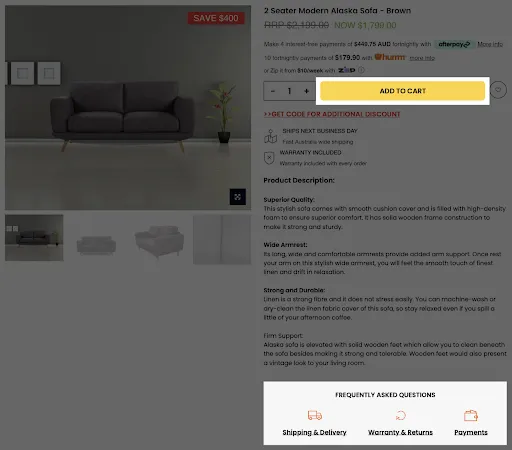
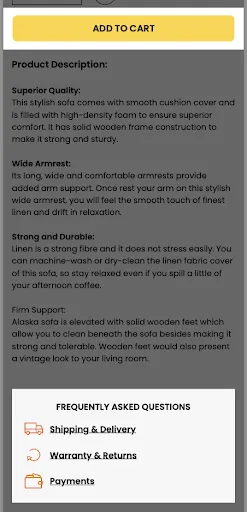
The variation added a "Frequently Asked Questions" section at the bottom of the product page, below the product description, with three links:
- Shipping and Delivery
- Warranty and Returns
- Payments
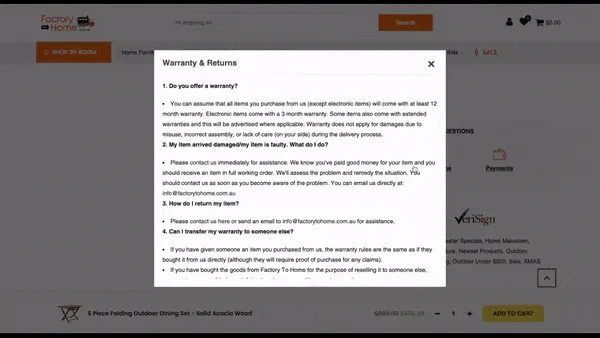
Each link had an icon. Clicking one opened the answers in a pop-up over the product page, so the shopper could read them and close the pop-up without losing their place. On desktop the three links sat side by side; on mobile they were stacked.
How was the test run?
The FAQ section was A/B tested against the original product pages on desktop and mobile. The team measured the rate of order completion and revenue per visitor and reported the results for desktop and mobile combined, with statistical significance checked for each device. The original case study does not state how long the test ran.
| Result | Figure or status |
|---|---|
| Rate of order completion, desktop and mobile combined | +18.1% |
| Revenue per visitor, desktop and mobile combined | +12.7% |
| Desktop significance | Reached, at a 96% confidence level |
| Mobile significance | Not reached; no negative impact seen |
| Decision | Rolled out on desktop and mobile |
What were the Factory to Home results?
Across desktop and mobile combined, the product page FAQs raised the rate of order completion by 18.1% and revenue per visitor by 12.7%. The desktop change reached statistical significance at a 96% confidence level. The mobile result did not reach significance, but the FAQs were rolled out on mobile too, because they showed no negative impact there.
One correction to the original title: it reads "12.7% increase in revenue", but the results section measures revenue per visitor, not total revenue. This page uses the metric from the results.
Why did revenue per visitor rise less than orders?
Revenue per visitor is the conversion rate multiplied by the average revenue per order. Orders per visitor rose 18.1% and revenue per visitor 12.7%, so the average order in the variation was a little smaller (1.127 divided by 1.181 is about 0.95). A possible reading is that the answers helped more shoppers complete lower-priced purchases. The original case study does not report order value, so this is an inference, not a finding.
Why did the product page FAQs work?
The FAQs most likely worked because they answered the questions that stop a furniture purchase at the moment the shopper was deciding. Delivery, warranty and payment are the practical worries behind a large online purchase. Putting the answers one click from the Add to Cart button, in a pop-up that keeps the shopper on the page, removed a reason to leave.
Rolling the change out on mobile without a significant mobile result was a judgment call. It is a reasonable one when the change helps shoppers, costs little and shows no harm, but it is not the same as a proven mobile win.
How to add FAQs to your product pages
Start with the questions your support team hears most before people buy, and answer them on the product page. Keep the answers short and specific, keep the shopper on the page, and test the section against your current page by device.
- Collect the real questions. Support emails, chat logs and returns reasons show what buyers worry about. For Factory to Home, it was shipping, warranty and payment.
- Answer them where buyers decide. On the product page, near the description and the Add to Cart button, not only on a separate FAQ page.
- Keep shoppers on the page. Use a pop-up or sections that expand in place, so reading an answer never means losing the product.
- Be specific. Delivery areas, warranty length and payment options in plain words do more than "fast shipping" or "secure payment".
- Keep the answers in the HTML. Text that loads only after a click can be missed by search engines and AI agents.
- Check significance per device. Here desktop reached 96% and mobile did not; know which you are rolling out on evidence and which on judgment.
The A/B test sample size calculator shows how much traffic a test needs, and the statistical significance calculator checks the result for each device. For a related test, read the policy visibility case study, and for shipping information shown beside the price, the free shipping badge case study.
Can AI shopping agents read your shipping and returns answers?
Only if the text is there for them. An AI agent buying for someone will check delivery, returns and payment terms before it recommends a store, and an answer that exists only inside a pop-up loaded by a script may never reach it. Keep the FAQ text in the page's HTML, link to full shipping and returns policies, and keep both consistent. Agent readiness is one of the eight checks in Convertica's free CRO audit.
Factory to Home case study FAQ
What did the Factory to Home case study test?
It tested a product page FAQ section for Factory to Home, an Australian furniture and homewares store. Three links, for shipping and delivery, warranty and returns, and payments, sat below the product description. Clicking one opened the answers in a pop-up, so shoppers got them without leaving the product page.
How much did the product page FAQs increase revenue?
Revenue per visitor rose 12.7% and the rate of order completion rose 18.1%, desktop and mobile combined. The desktop result reached a 96% confidence level. The mobile result did not reach statistical significance, but the change was rolled out on mobile too because it showed no negative impact.
Is the 12.7% a revenue increase or a revenue per visitor increase?
It is revenue per visitor. The original case study's title says a 12.7% increase in revenue, but its results section reports a 12.7% increase in revenue per visitor, desktop and mobile combined. Revenue per visitor is total revenue divided by the number of visitors in the test, so it is the fairer measure of a test.
How long did the Factory to Home test run?
The original case study does not state the test length. It reports a 96% confidence level for desktop and no significant result for mobile. Because the duration is not published, this page reports the figures without a timeframe and treats them as one test on one store.
Why put shipping, warranty and payment FAQs on the product page?
Because that is where buyers decide. Fears about buying online often surface at checkout, such as how long delivery takes, what happens if an item arrives damaged and how to pay. Answering them where the shopper adds to cart lets them move forward without leaving the page to search for answers.
Should product page FAQs open in a pop-up or on a separate page?
Keep shoppers on the product page. In this test the answers opened in a pop-up over the product page, so closing it put the shopper back where they were, next to the Add to Cart button. Expandable sections that open in place do the same job and keep the text in the page for search engines and AI agents.
Can Convertica run this kind of test on my store?
Convertica starts with the free CRO audit, an app that checks your page for people and for AI agents while you watch. After it, if you want the fixes built for you, the one page rebuild covers one page and the full site rebuild covers your whole site: Convertica's team builds every fix the audit found.
