Trust and social proof
Trust badges: types, placement and how to build trust online
Trust badges are small seals, logos and icons that reassure shoppers a site is secure, legitimate and safe to buy from. Used well, they answer a specific worry at the moment someone decides. This guide covers the types of trust badges, where to put them, how to add them, and the reviews, policies and social proof that build trust online.
Short answer
Trust badges are seals, logos or icons on a website that reassure visitors the site is secure, legitimate and safe to buy from. They work best when each one answers a real worry and sits where that worry peaks: beside the add to cart button, in the cart and at payment.
- There are six main types of trust badges: security seals, payment badges, policy badges, review badges, endorsement badges and media mentions.
- Choose badges from your buyers' real doubts, not from a list of available seals.
- Write every promise a badge makes in text too, so screen readers and AI agents can read it.
- Never show fake or expired seals, and avoid walls of logos that push the main button down.
- Online reviews are the strongest form of social proof in ecommerce, and where they sit on the page matters as much as having them.
What are trust badges?
Trust badges are seals, logos or icons on a website that reassure visitors the site is secure, legitimate and safe to buy from. Some come from third parties, such as a certificate provider, a payment company or a review platform. Others state your own promises, such as free returns or a money-back guarantee. They are also called trust seals, trust marks or trust icons.
They work because buying online asks for trust before the shopper gets anything. Will the product match the page? Is my card safe? Can I send it back? A trust badge offers a shortcut to an answer, borrowed from a name the shopper already knows or a promise stated plainly. That is also their limit: a badge cannot make an unconvincing site convincing. It works when the rest of the page is already doing its job.
Types of trust badges
There are six main types of trust badges: security seals, payment badges, policy badges, review badges, endorsement badges and media mentions. Each answers a different worry, so the right mix depends on what your buyers doubt. A shopper worried about card fraud needs a different reassurance from one worried about whether a jacket will fit.
| Type | Examples | Worry it answers | Best placement |
|---|---|---|---|
| Security seals | Seals from your certificate provider or a site scanning service | Is this site safe to enter my details on? | Checkout and payment step |
| Payment badges | Logos of the cards, wallets and services you accept | Can I pay the way I want, with a company I trust? | Product page near add to cart, cart, checkout |
| Policy badges | Free returns, money-back guarantee, free shipping over a threshold | What if it is wrong, late or not as described? | Near the price and the add to cart button, cart |
| Review badges | Star ratings and review counts from a review platform or your own reviews | Do people like me rate this store and product? | Near product titles, homepage, cart |
| Endorsement badges | Business accreditation, industry body membership, certifications | Is this a real, accountable business? | Footer, about page, checkout for high-value orders |
| Media mentions | "As featured in" logos of real coverage | Has anyone credible noticed this brand? | Homepage, landing pages |
Do trust badges increase conversions?
Trust badges can increase conversions when they answer a real worry at the moment of decision, and do little when they are decoration. The evidence that matters is a test on your own site. Badge sellers publish impressive lifts, but those come from their own customers and setups. Convertica treats a badge like any other change: a hypothesis to test.
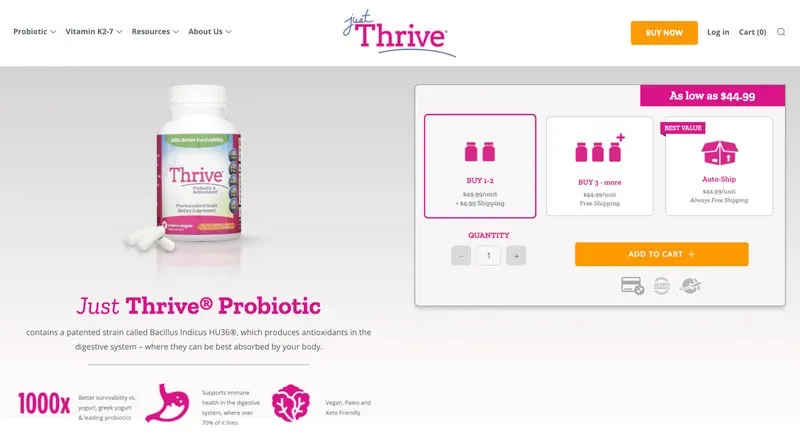
Convertica's JustThrive case study is a good example of trust signals used with intent. On the supplement store's product page, social media icons beside the Add to Cart button were replaced with icons for a 30-day guarantee, secure payment options and shipping. That was one of three changes in the first variation, alongside less visual clutter and a more prominent auto-ship offer, so the trust icons cannot take sole credit. The variation raised the conversion rate 25.4% over the original in a split test run from 7 December to 15 January at 98% significance.
The lesson is placement and relevance: answers to the buyer's real questions (will it work, is my payment safe, when will it arrive) placed right beside the button.
Where to place trust badges
Place trust badges where doubt peaks: beside the add to cart button, in the cart next to the checkout button, and on the payment step of checkout. Match each badge to the question at that point. Returns and delivery promises belong near the price; payment and security badges near the checkout button; review ratings near the product title. Badges only in the footer are seen by few buyers.
-
Product page, beside add to cart
Show your returns or guarantee promise, delivery terms and the payment methods you accept, as small icons with a few words each. This is where the shopper decides whether to commit.
-
Cart, beside the checkout button
Restate shipping cost, delivery time and returns. Convertica's policy visibility case study added shipping and refund policy badges under the cart's checkout button, each opening a short pop-up. Desktop order completion rose 21.8% at a 97% confidence level, with no significant change on mobile; the case study does not state the test length.
-
Checkout and payment step
This is where security seals and payment logos earn their place, because the shopper is about to enter card details. Keep them close to the payment fields and the final button.
-
Homepage and landing pages
Review ratings, real media mentions and a short line on your guarantee help new visitors decide whether to explore further.
-
Footer and about page
Business accreditation, company details and secondary logos belong here, for the careful visitor checking who you are.
How to choose the right trust badges
Choose trust badges by starting from your buyers' doubts, not from a list of available seals. Read support questions, reviews, chat logs and answers to an on-page poll, then pick the badges that answer the worries that come up most. Prefer names your buyers recognize, and promises you actually keep. One relevant badge beats a row of unfamiliar ones.
- It answers a worry your buyers actually have
- Your buyers recognize the name or understand the promise at a glance
- You have the right to show it, and follow the owner's usage rules
- Any promise it makes (returns, guarantee, delivery) is one you honor
- It sits where that worry comes up, not only in the footer
- It is small enough not to compete with the main button
- The same promise is written in text, so screen readers and AI agents can read it
Trust badge mistakes to avoid
- Fake or expired seals. Showing a seal you do not hold, or one for a lapsed service, is dishonest and easy to check.
- Badge walls. Ten logos in a row look anxious and push the button down.
- Unknown names. A seal nobody recognizes adds little reassurance.
- Promises in small print. A "free returns" badge with conditions hidden elsewhere damages trust when found.
- Images only. A guarantee shown only as an image cannot be read by assistive technology or AI agents.
- Footer only. Few buyers reach the footer at the moment they decide.
How to add trust badges to Shopify, WordPress and WooCommerce
Add trust badges through your theme rather than pasting images into product descriptions, so they appear consistently on every product and in the cart. On Shopify, use your theme's icon or image blocks, an app that adds badges as an app block, or a developer edit to the theme code. On WordPress and WooCommerce, use a block, a widget or a plugin that places badges near the add to cart button.
Shopify
- Open the theme editor and go to the product page template.
- Check whether your theme has an icon, image or text block you can place under the add to cart button. Many do.
- If not, install a badge app that provides an app block, then add and position the block in the theme editor.
- Repeat for the cart page or cart drawer.
- Check the result on a phone, and make sure the same promises appear in text.
The checkout itself is not part of the theme. Shopify retired the old checkout.liquid file for the checkout steps, and its developer documentation says checkout UI extensions for the information, shipping and payment steps are available only to stores on a Shopify Plus plan. On other plans, put your badges and promises on the product page and in the cart, where you control the theme, and rely on Shopify's standard checkout for the payment step. Source: Shopify, checkout UI extensions.
WordPress and WooCommerce
- Prepare the badge images, using each payment brand's official logo files and usage rules.
- Add them with a block or widget area near the add to cart button, or use a plugin built for trust badges.
- Add alt text to each image that states what it means, such as "Free returns within 30 days" for a returns badge on a store that offers that.
- Check the product page, cart and checkout on desktop and on a phone.
Security seals usually come with their own embed code from the provider of your certificate or scanning service. Payment companies publish their logos and badges with brand guidelines; use the official files. Badges are one small part of WooCommerce conversion rate optimization; the ecommerce CRO guide covers the rest.
How to build trust online beyond badges
To build trust online, show the real business behind the site and remove every reason to doubt it: clear contact details and company information, honest product information, prices that include shipping, plain returns and delivery policies, real customer reviews, secure payment, and a site that is fast and works on a phone. Badges support these signals. They cannot replace them.
- Show who you are. Company name, address, phone or email, and an about page with real people.
- Be specific. Exact delivery times, exact return windows, exact materials. Vague promises read as hedging.
- Show the full price early. Shipping and taxes that appear at the last step feel like a trick.
- Make help easy to reach. Visible contact options and fast replies reassure people before they buy.
- Look after the basics. Broken links, typos and slow pages all signal a business nobody is minding.
Social proof and online reviews
Social proof is the tendency to treat what other people do as a guide to what we should do, and online reviews are its strongest form in ecommerce. Psychologist Robert Cialdini named it in his 1984 book Influence, building on earlier conformity research such as Solomon Asch's line experiments in the 1950s. For a store, it means showing that real people bought, used and rated your products.
Forms of social proof that work on store and service sites:
- Product reviews with star ratings, written by verified buyers, including the critical ones you have answered.
- Review platform ratings that visitors can check for themselves.
- Customer photos and videos of the product in real use.
- Testimonials with a real name and, for business buyers, a company.
- Client logos and case studies for services, with results that carry their metric, timeframe and source.
Where reviews sit matters as much as having them. In Convertica's reviews section case study, moving product reviews from the bottom of the page to just below the product lifted completed orders 20.34% for a jewelry store, with the gain on desktop, in a two-week test at a 98% confidence level.
Never invent reviews, edit their wording or show only the five-star ones. Fake social proof is easy to spot and breaks trust at once, and fake reviews are a target of consumer protection rules in many countries.
Trust signals AI agents can read
AI shopping agents and AI search read text and structured data, not badge images. A returns guarantee shown only as an icon is invisible to them, so an agent comparing stores for a shopper may report that you have no returns policy at all. State every promise a badge makes in plain text near the badge, and describe your return policy and shipping in structured data where your platform supports it.
Schema.org, the shared vocabulary search engines use for structured data, includes a MerchantReturnPolicy type for return policies and shipping details for offers. Agent readiness is one of the eight checks in Convertica's free CRO audit.
Trust badges checklist
Use this trust badges checklist on your product page, cart and checkout. Every "no" is something to fix or test.
- Payment logos match the methods you actually accept
- A returns or guarantee promise sits beside the add to cart button
- Shipping cost and delivery time appear before checkout
- Security wording or a seal sits on the payment step
- Review ratings sit near product titles and link to the reviews
- Contact details and company information are easy to find
- Every badge you show is current and yours to use
- Every promise a badge makes is also written in text
- Badges are small and do not push the main button down
- Changes were tested, or at least measured before and after
Questions about trust badges
What are trust badges?
Trust badges are seals, logos or icons on a website that reassure visitors it is secure and legitimate. They include security seals from certificate providers, logos of accepted payment methods, policy badges such as money-back guarantees and free returns, endorsements from review platforms or business bodies, and media mentions.
Do trust badges increase conversions?
They can, when they answer a real worry at the point of decision, such as payment security beside the checkout button or a returns promise beside add to cart. They do little on a site that looks unreliable for other reasons, and too many can look desperate. Test them on your own store rather than relying on claims from badge sellers.
Where should trust badges go on a website?
Put trust badges where doubt peaks: beside the add to cart button on product pages, in the cart near the checkout button, and on the checkout and payment step. Policy badges belong near prices and buttons; review ratings near product titles. The footer is fine for extra logos, but badges only in the footer are seen by few buyers.
How many trust badges should I use?
Use as few as answer the main worries on that page, often two to four near a button. Each badge should mean something to the buyer: a payment method they use, a guarantee you honor, a review score they can check. A long row of unfamiliar seals adds clutter and can raise doubt instead of lowering it.
Are trust badges free?
Many are. Payment method logos, policy badges for your own guarantees and review platform widgets are often free to show, within each brand's usage rules. Security seals tied to a certificate or a monitoring service are usually part of a paid product. Only show a seal you have the right to use.
What is a secure checkout badge?
A secure checkout badge is a seal or icon near the payment fields that tells shoppers their card details travel over an encrypted connection, usually from your certificate provider or payment company. It only states what is true of your site. Since Chrome 117 in September 2023, Chrome no longer shows a lock in the address bar for HTTPS sites, so a clear security line on the payment step does more of that work.
How do I add trust badges to Shopify?
On Shopify, add trust badges through the theme editor: many themes have an icon or image block for the product page and cart, apps can add badges as app blocks you place where you want, and a developer can add them to the theme code. Place them next to the add to cart and checkout buttons, and check them on a phone. Shopify's own checkout pages are different: custom content on the information, shipping and payment steps needs checkout UI extensions, which Shopify makes available only on its Plus plan.
How do you build trust online with customers?
Build trust online by showing a real business behind the site: clear contact details and company information, honest product information, visible prices including shipping, plain returns and delivery policies, real customer reviews, secure payment, a professional, fast site, and quick, helpful replies when people ask questions. Badges support these; they do not replace them.
