Ecommerce examples
Ecommerce website examples: 20 stores audited
Most lists of ecommerce website examples are screenshot galleries. These 20 are real US stores whose homepage and one product page we ran through Convertica's free CRO audit, with what stands out, what you can learn, what the audit flagged and the fix.
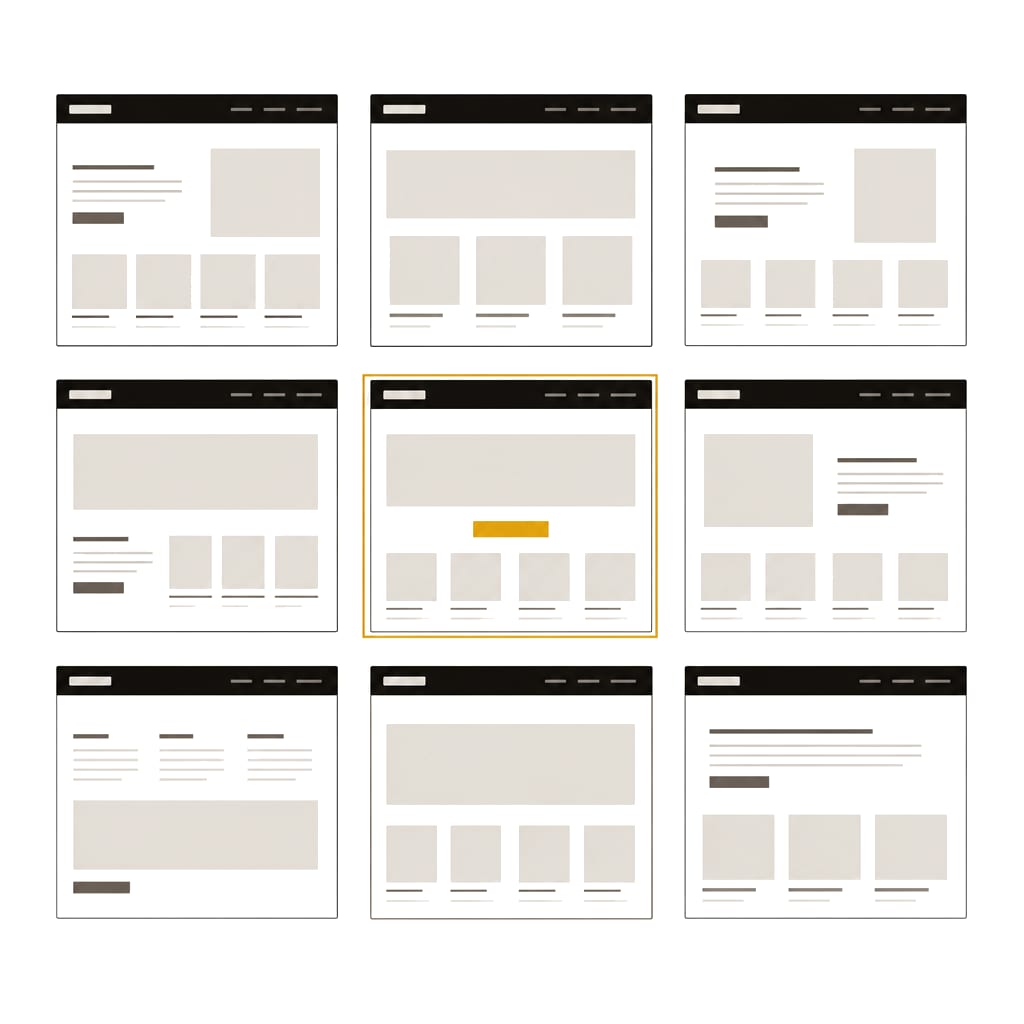
The 20 online store examples, homepage and product page
Each example below follows the same pattern for both pages: what stands out, what you can learn, what Convertica's audit flagged and the fix it gave. Want the same list for your own store? The free CRO audit gives every finding with its evidence and fix.
About these examples. These stores were picked as well-known public examples. They are not Convertica clients and are not affiliated with or endorsing Convertica; their names are used only to identify the pages discussed. The findings reflect one automated check of each page on 24 or 25 October 2026 from a test browser outside the US, and the pages may have changed since. If you work for one of these brands and want an entry updated or removed, contact us and we will act on it.
Jump to a category: apparel and shoes, outdoor and activewear, home and furniture, food, drink and kitchen, beauty and personal care, accessories, travel and eyewear, or the table of every finding.
Apparel and shoe store examples
1. Allbirds
Homepage
What stands out. A short brand line, "Wildly Comfortable. Super Natural.", with two buttons, Shop Men and Shop Women, so a visitor picks a route in one click.
What you can learn. When your range splits cleanly, let the first buttons do the sorting.
What our audit flagged. No JSON-LD in the raw HTML or after JavaScript ran, so nothing states the business or its products in a form search engines and AI agents read directly. On a phone, 7% of the text was under 12px.
The fix. Add Organization markup, plus Product and Offer markup where products appear, and raise small print to at least 14px.
Product page: Men's Tree Runner
What stands out. Price, free shipping, color and size sit together, with a fit note under the sizes: the shoe tends to run small, so size up.
What you can learn. A one-line fit note answers the question that most often stops a shoe purchase.
What our audit flagged. 8% of the text was under 12px on a phone, content shifted while loading (layout shift 0.111), the JSON-LD had no Organization, and the page had two H1 headings.
The fix. Raise small print, reserve space for images and banners, add Organization markup and keep one H1 for the product name.
2. Bombas
Homepage
What stands out. A row of category tiles straight under the header, so a visitor who knows what they want gets there without scrolling.
What you can learn. Category tiles near the top serve returning shoppers as well as new ones.
What our audit flagged. No JSON-LD, and neither Organization markup nor an og:site_name tag named the business. The title was 86 characters, and there was no og:image.
The fix. Add Organization markup and og:site_name, add og:image, and keep the title near 60 characters with the topic first.
Product page: Men's Merino Wool Blend Calf Sock 4-Pack
What stands out. A Single, 4-Pack and 8-Pack selector with the pack savings shown, beside color and size.
What you can learn. A pack selector on the product page raises order size without a separate bundle page.
What our audit flagged. The business name was again missing from markup, and the JSON-LD had no Organization.
The fix. Add one Organization node site-wide; the free schema markup generator builds it.
3. Quince
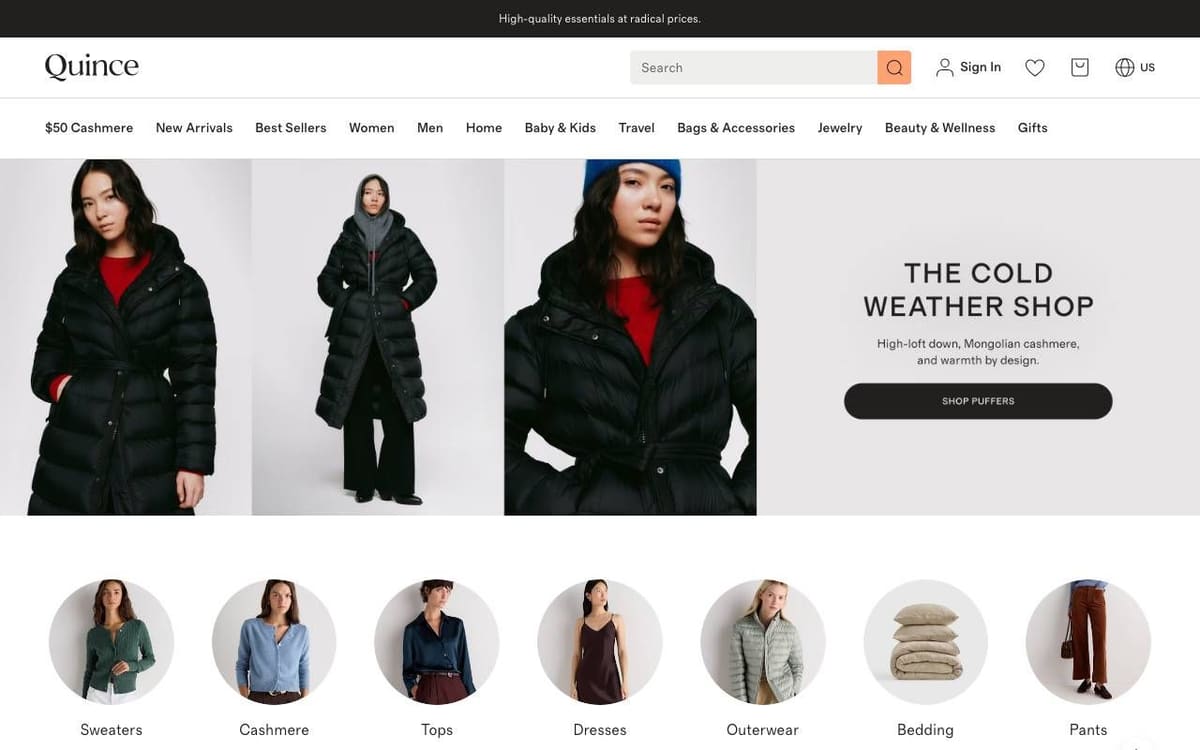
Homepage
What stands out. The first menu item names the hero product and its price point, and a wide search field sits in the header.
What you can learn. If one product drives your store, put it first in the navigation.
What our audit flagged. On a phone, the largest text on the first screen was 16px and no H1 was visible there. 12% of the mobile text was under 12px, and the email field was not type email.
The fix. Add one short headline at the top of the mobile layout, raise small print, and set type="email" on the field.
Product page: Mongolian Cashmere Crewneck Sweater
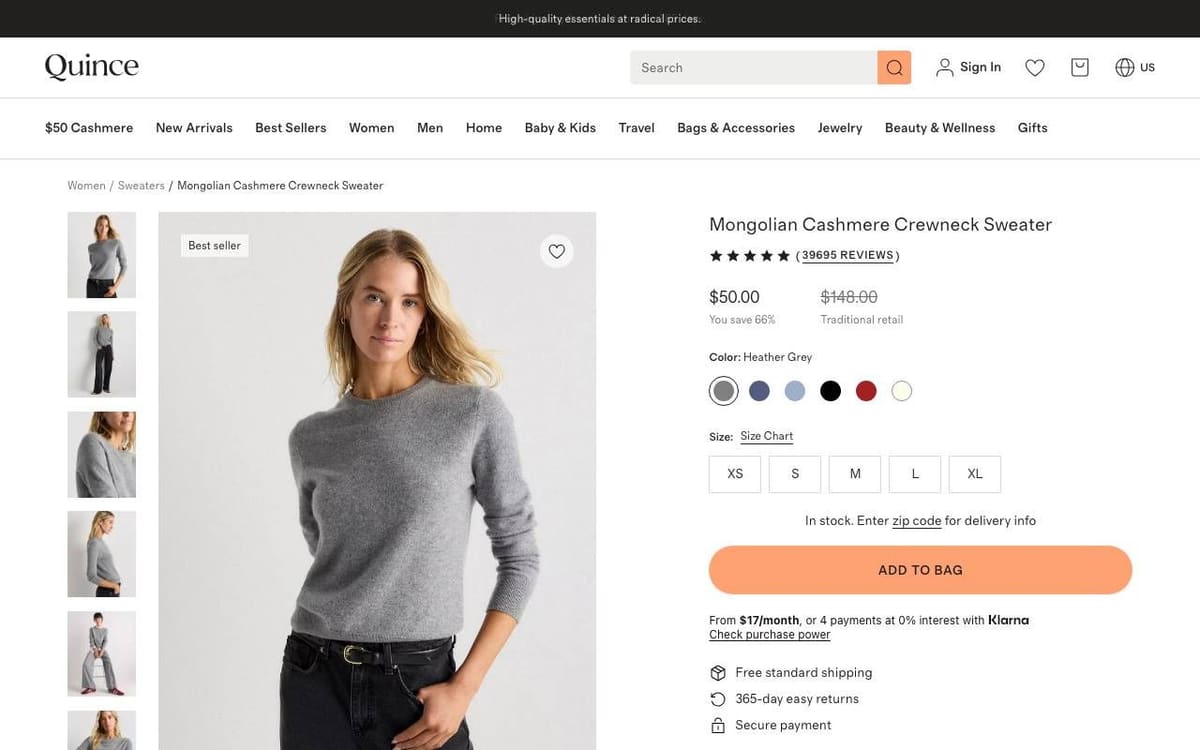
What stands out. Everything a buyer checks is on the first screen: review count, price, colors, sizes, stock, one bright Add to Bag button, pay over time, free shipping and 365-day returns.
What you can learn. Put the delivery and returns terms directly under the button, where the decision is made.
What our audit flagged. The email field again was not type email, nothing in the markup named the business, and 6% of the mobile text was under 12px.
The fix. Set type="email", add Organization markup with the business name, and raise small print.
4. Rothy's
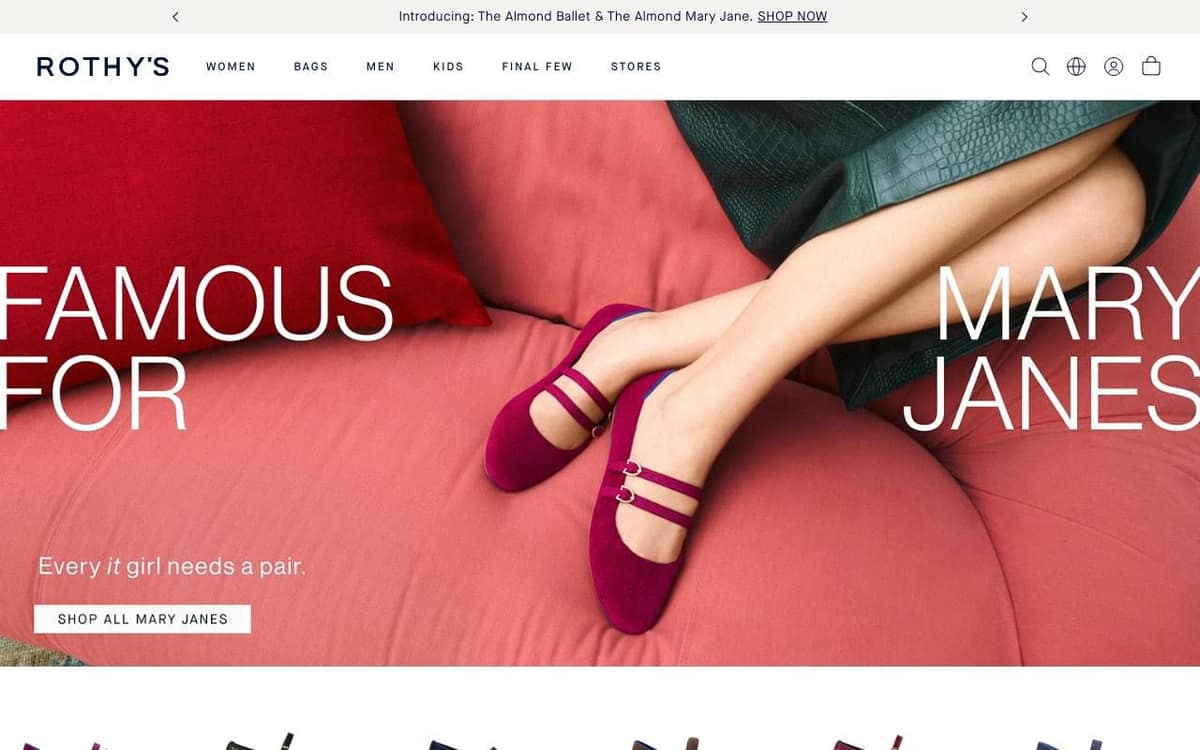
Homepage
What stands out. One product, one claim in very large type and one link to shop it.
What you can learn. A single bold product shot can carry a homepage when the brand is known for that product.
What our audit flagged. 64 visible links on the first desktop screen, and 15 of 47 tappable elements under 24px on a phone.
The fix. Trim or group the links near the top so the main action stands out, and enlarge small tap targets.
Product page: The Almond Mary Jane
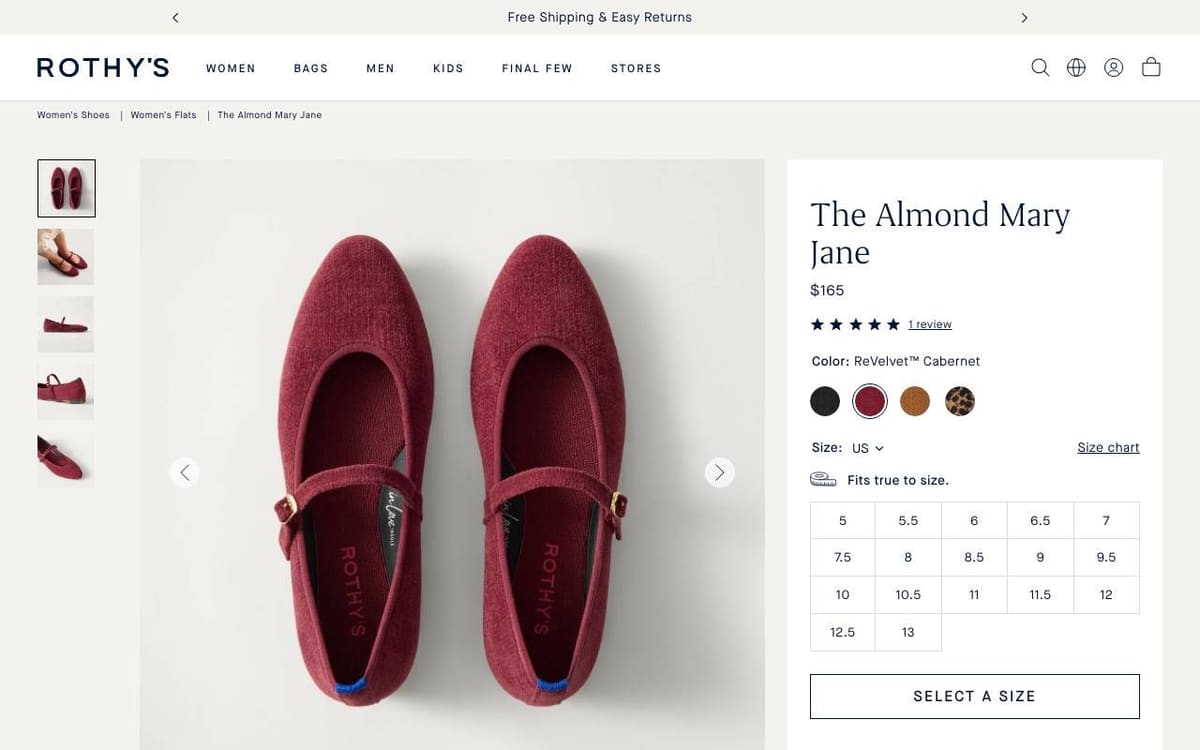
What stands out. A clean buy box: name, price, rating, swatches, a "Fits true to size" note and a size grid with every size visible at once.
What you can learn. Showing all sizes as buttons, not a dropdown, makes stock and choice clear in one look.
What our audit flagged. 61 links on the first desktop screen, 13 of 41 tappable elements under 24px on a phone, and on the phone the add button sat below the first screen, under the photos and the size grid.
The fix. Group the navigation links, enlarge small targets, and keep a sticky add button in view on phones.
Outdoor and activewear store examples
5. Cotopaxi
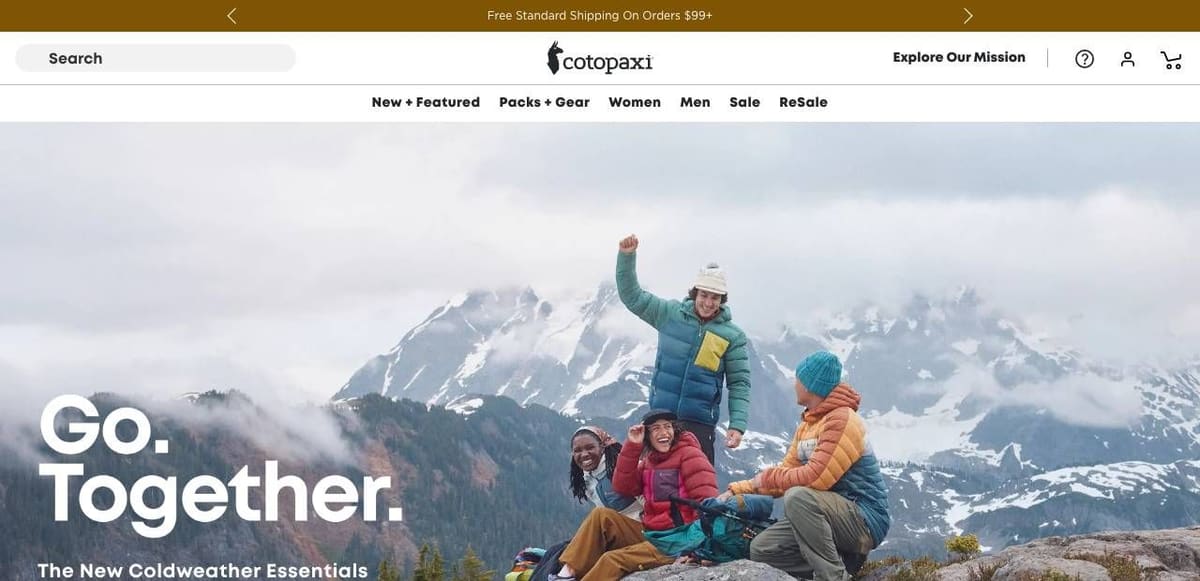
Homepage
What stands out. A photo that shows the products in use, a two-word headline, a search field on the left and the free shipping threshold in the top bar.
What you can learn. State the shipping threshold once, at the very top, so it follows the visitor to every page.
What our audit flagged. On a phone, the largest text on the first screen was 16px and no H1 was visible. The page had five H1 headings in all.
The fix. Put one short headline that says what you sell at the top of the mobile layout, and keep one H1.
Product page: Allpa 35L Travel Pack
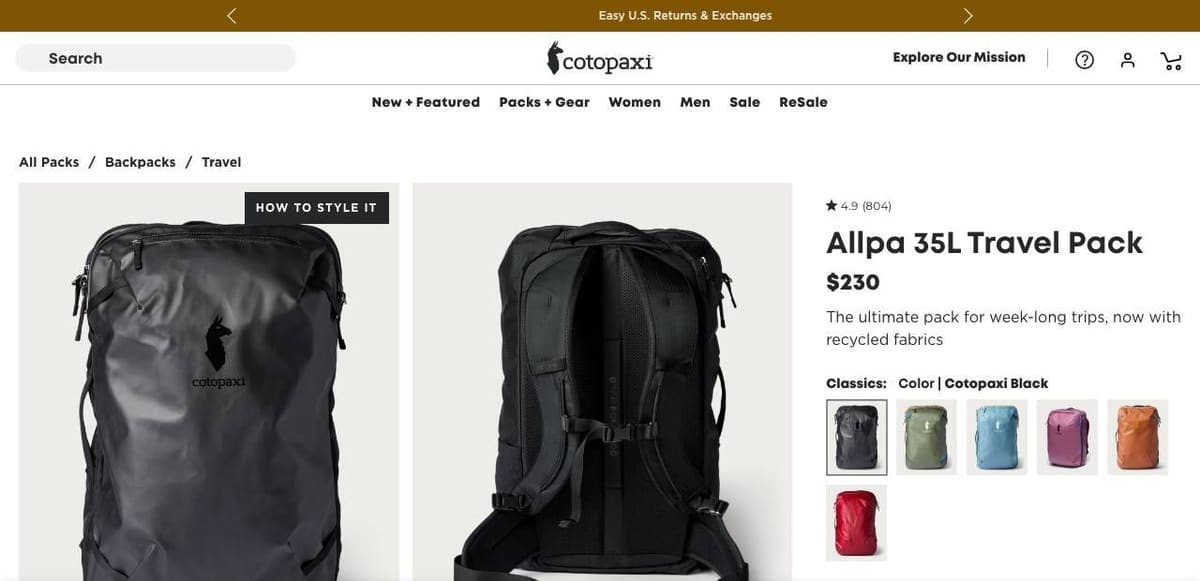
What stands out. Rating, name, price and a one-line summary of what the pack is for, then swatches and pack sizes as buttons.
What you can learn. One sentence on the use case ("week-long trips") helps a shopper pick between sizes.
What our audit flagged. 11% of the text was under 12px on a phone, four tap targets on the first phone screen were under 24px, including the breadcrumb links, and the page had four H1s.
The fix. Raise small print, give breadcrumbs more tap room, and keep one H1 for the product.
6. Gymshark
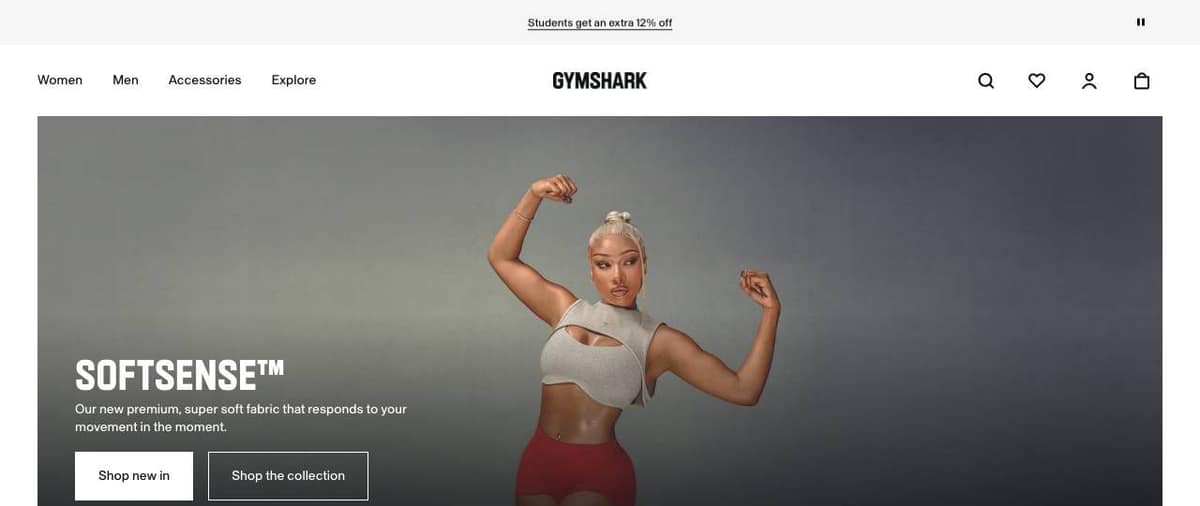
Homepage
What stands out. The hero names one product line, says in one sentence what is new about it, and offers two buttons with different weights.
What you can learn. Lead with what is new, and let one button be clearly primary.
What our audit flagged. No review counts, star ratings or testimonials anywhere on the homepage, no returns wording, and heading levels that jumped, for example from h2 to h5.
The fix. Show real reviews or a rating summary near the main button, state the returns terms, and nest headings in order.
Product page: Softsense Sports Bra
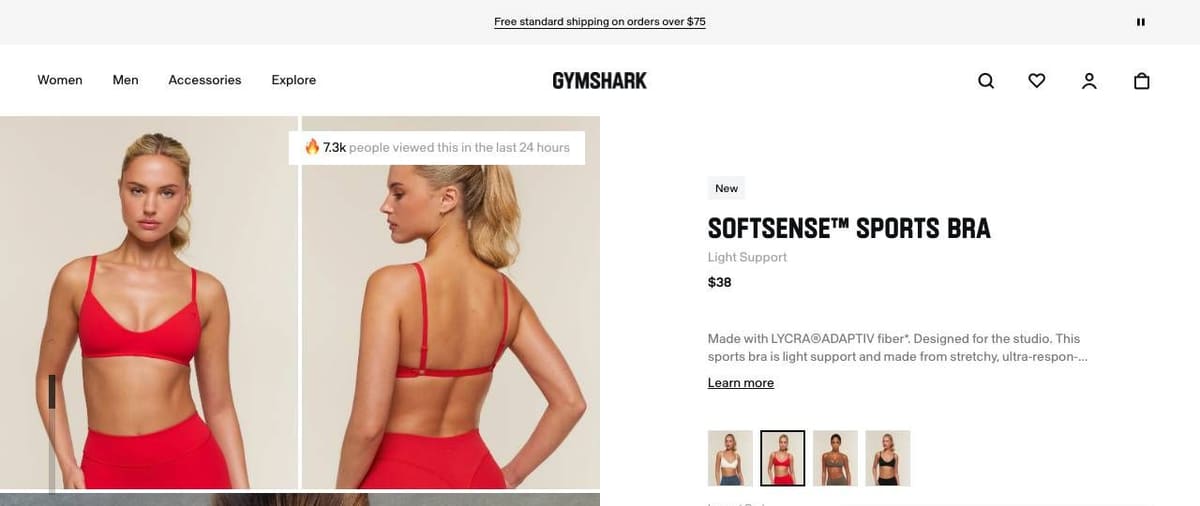
What stands out. Name, price and one line on the fabric, with color thumbnails as photos rather than dots.
What you can learn. Photo swatches show the real color better than a flat dot.
What our audit flagged. 16 tap targets on the first phone screen were under 24px, including the promotion links in the top bar, and the headings jumped from h1 to h5.
The fix. Enlarge the top bar links, keep at least 24px between tap targets, and nest headings in order.
7. Vuori
Homepage
What stands out. One product line, "Vuori Galaxy", one sentence and one Shop Now button, with a search field that has an "Ask Vuori" option.
What you can learn. A search field that accepts questions suits shoppers who do not know the product names yet.
What our audit flagged. No guarantee, refund or returns wording on the page, four carousel dots under 24px on the first phone screen, and no og:image.
The fix. State the returns terms near the button, enlarge the carousel controls, and add og:image.
Product page: Kore Short Lined 7"
What stands out. A Best Seller tag, price, review count, the model's height and size, and inseam choices beside sizes.
What you can learn. "Model is 6'3" in size M" answers the fit question without a size chart.
What our audit flagged. One form field relied on placeholder text instead of a label, the Organization markup listed no sameAs profiles, and headings jumped from h1 to h4.
The fix. Add a visible label, add the official social profiles to sameAs, and nest headings in order.
Home and furniture store examples
8. Brooklinen
Homepage
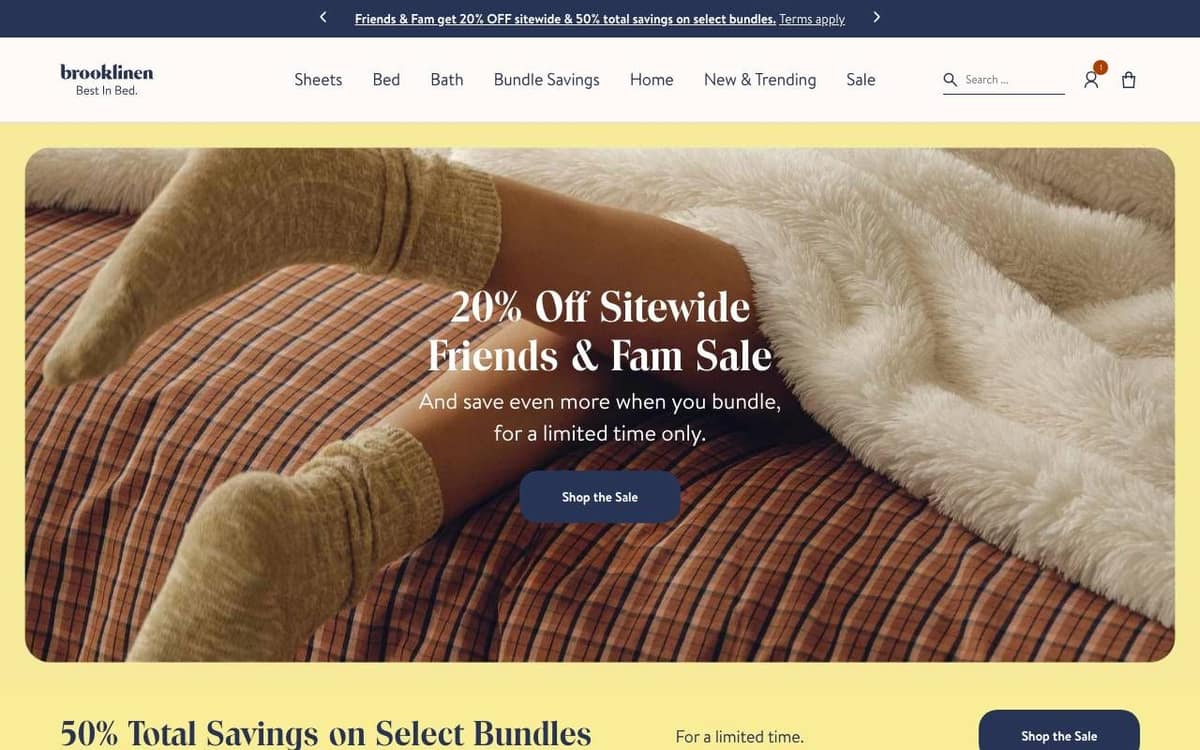
What stands out. One headline states the offer, one line explains it, one button acts on it. The navigation names real categories, and search is an open field.
What you can learn. An offer you can read in two seconds beats a clever line.
What our audit flagged. Product markup with no Offer and no price, and two H1 headings.
The fix. Add an Offer with price and priceCurrency, and keep one H1 that names the page topic.
Product page: Luxe Sateen Core Sheet Set
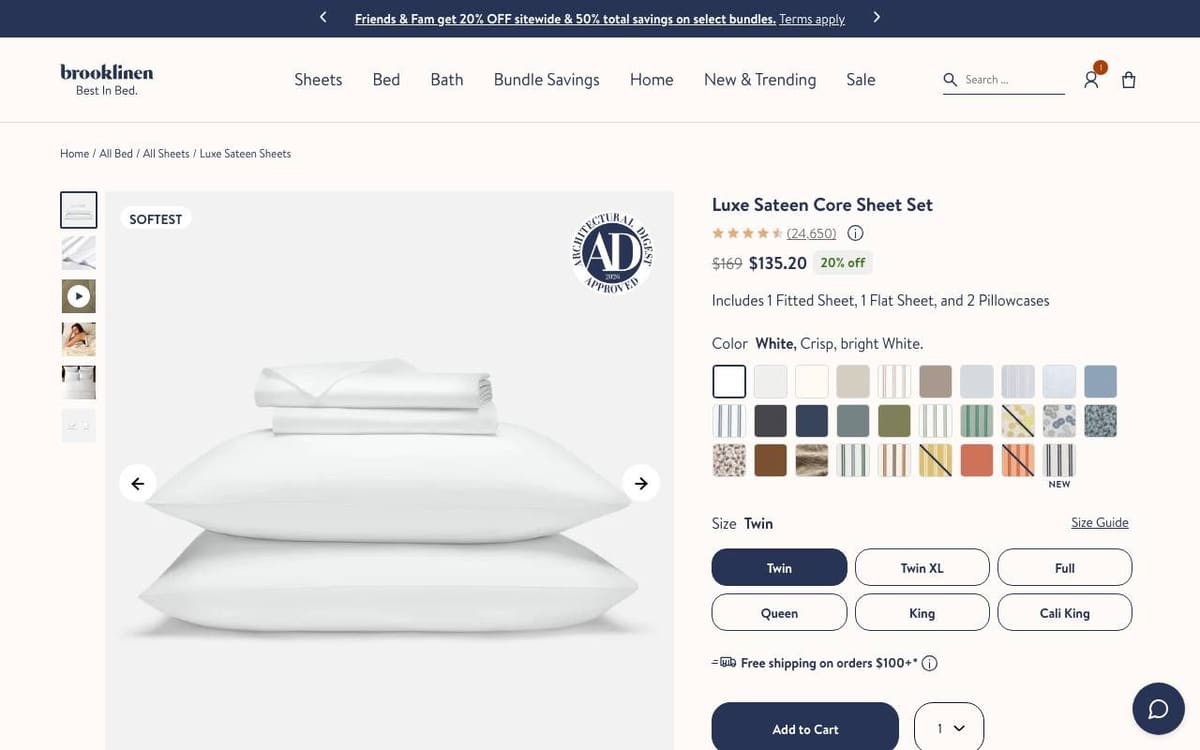
What stands out. Rating and review count, the sale price with the discount, and one line on what the set includes, then swatches, sizes and the button.
What you can learn. "Includes 1 Fitted Sheet, 1 Flat Sheet, and 2 Pillowcases" removes a question every set buyer has.
What our audit flagged. On a phone, Add to Cart sat below the first screen, under the photo and swatches; content shifted while loading (layout shift 0.148); and there was no Organization markup.
The fix. Keep a sticky add button on phones, reserve space for images, and add Organization markup.
9. Burrow
Homepage
What stands out. The hero says in-stock pieces ship in days, and its headline, "Get Comfortable Faster", repeats the point, with one Shop Now button.
What you can learn. If speed is your edge over other furniture stores, say it twice.
What our audit flagged. An email signup popup covered the whole first phone screen on load, and the audit found no review counts, ratings or returns wording on the homepage.
The fix. Delay the popup until the visitor engages, and show real ratings and the returns terms near the button.
Product page: Nomad Sofa
What stands out. Review count above the name, the price with a code price beside it, then configuration, fabric and leg finish as visual choices.
What you can learn. Showing configurations as small drawings makes a complex product easy to choose.
What our audit flagged. 27 links and 12 different buttons on the first desktop screen, no business name in markup and two unlabeled fields.
The fix. Group the choices so one primary button stands out, add Organization markup, and label every field.
10. Casper
Homepage
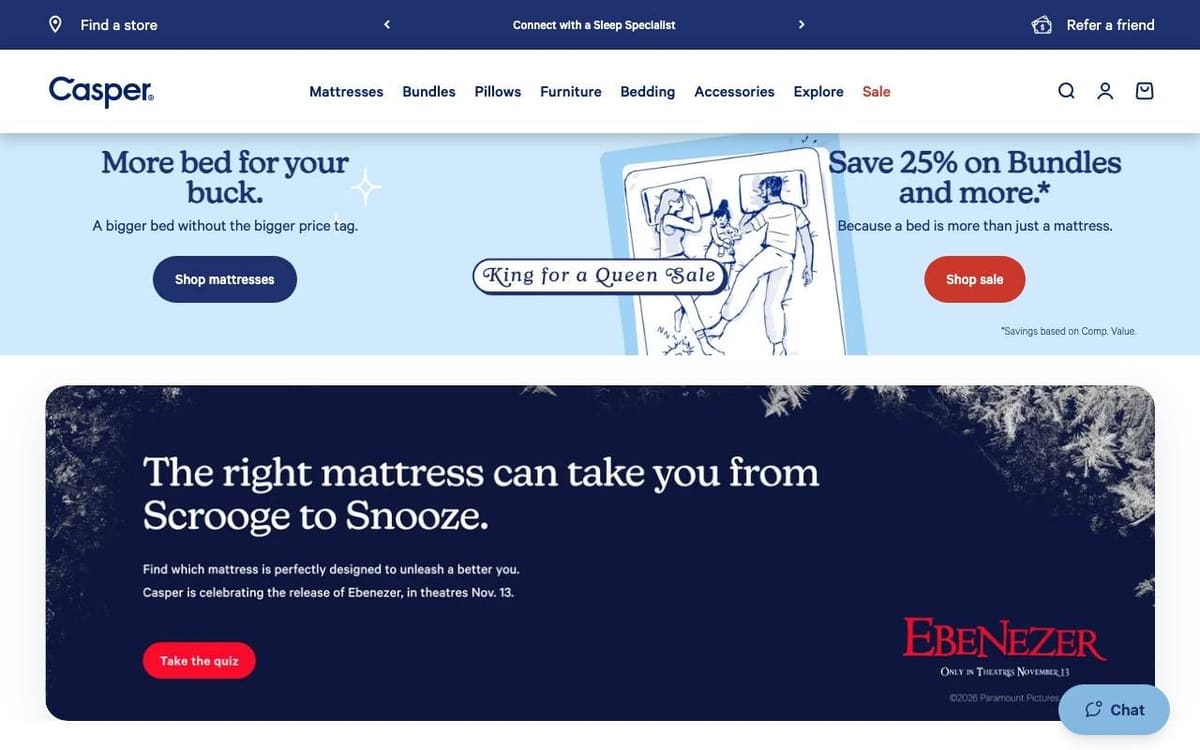
What stands out. Two promotions side by side, each with its own button, and a mattress quiz just below.
What you can learn. A quiz gives unsure shoppers a route that is not a product list.
What our audit flagged. 84 visible links on the first desktop screen, its one finding.
The fix. Trim or group the links near the top so the two promotions stand out.
Product page: Snow Cooling Hybrid Mattress
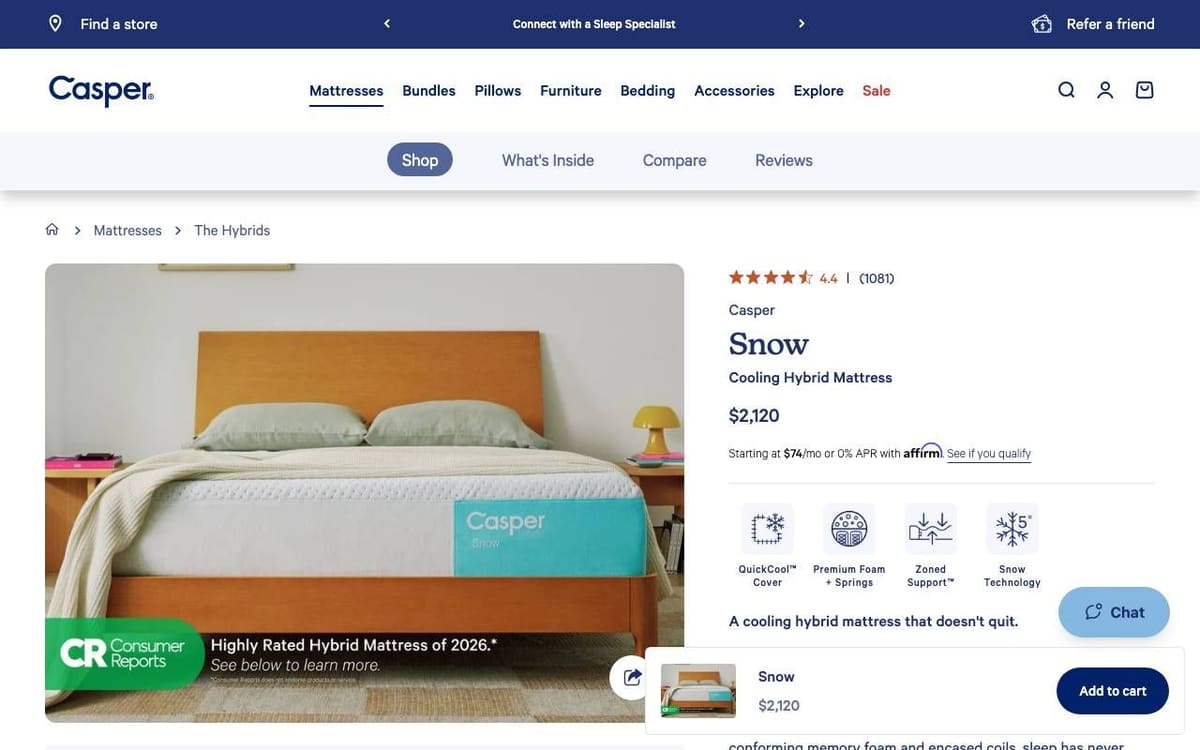
What stands out. Rating, price, a monthly payment line and four feature icons, with a bar that keeps Add to cart in view.
What you can learn. For an expensive product, a monthly figure next to the price reframes the decision.
What our audit flagged. 87 links on the first desktop screen and no Organization markup.
The fix. Group the menu links and add Organization markup.
11. Parachute
Homepage
What stands out. The top bar states free shipping on every order and 60 day returns, above a calm "Cue the Layers" hero.
What you can learn. Two short terms in the top bar answer the two biggest worries before the visitor scrolls.
What our audit flagged. No JSON-LD at all, a discount popup covering the whole first phone screen, and an 85 character title.
The fix. Add Organization and Product markup, delay the popup, and shorten the title to about 60 characters.
Product page: Percale Sheet Set
What stands out. Sold out colors are labeled in the swatch list, and the price is on the button: "Add to bag" with the total.
What you can learn. A price on the button confirms the total at the moment of the click.
What our audit flagged. No meta description, 15 of 84 tappable elements under 24px on a phone, and 30 links on the first desktop screen.
The fix. Write a meta description that names the product, and enlarge small tap targets.
12. Ruggable
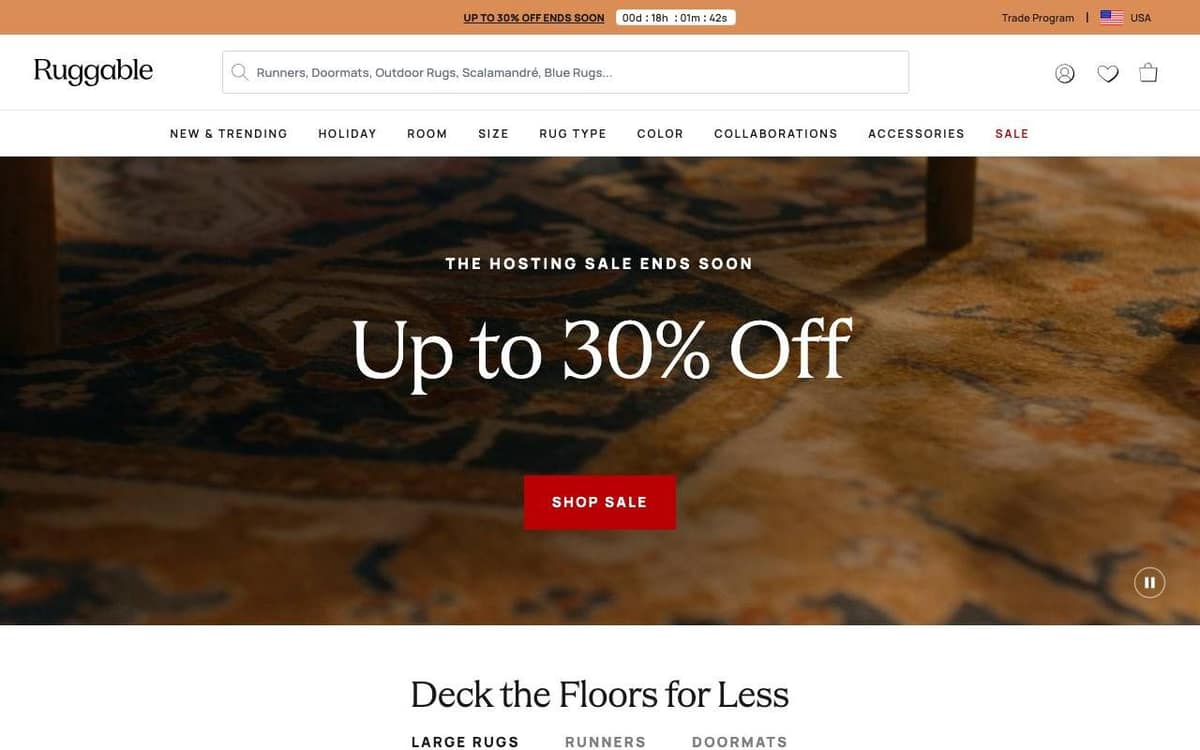
Homepage
What stands out. Search gets the full width of the header, which suits a catalog this size, and the hero has one headline and one button.
What you can learn. The bigger the catalog, the bigger the search field should be.
What our audit flagged. Prices showed on the rendered page but not in the raw HTML, 30 of 71 tappable elements were under 24px on a phone, and the "Phone" field was type text.
The fix. Render prices on the server, enlarge tap targets, and set type="tel". The AI visibility checker shows what a page says before JavaScript runs.
Product page: Annika Tufted Rug
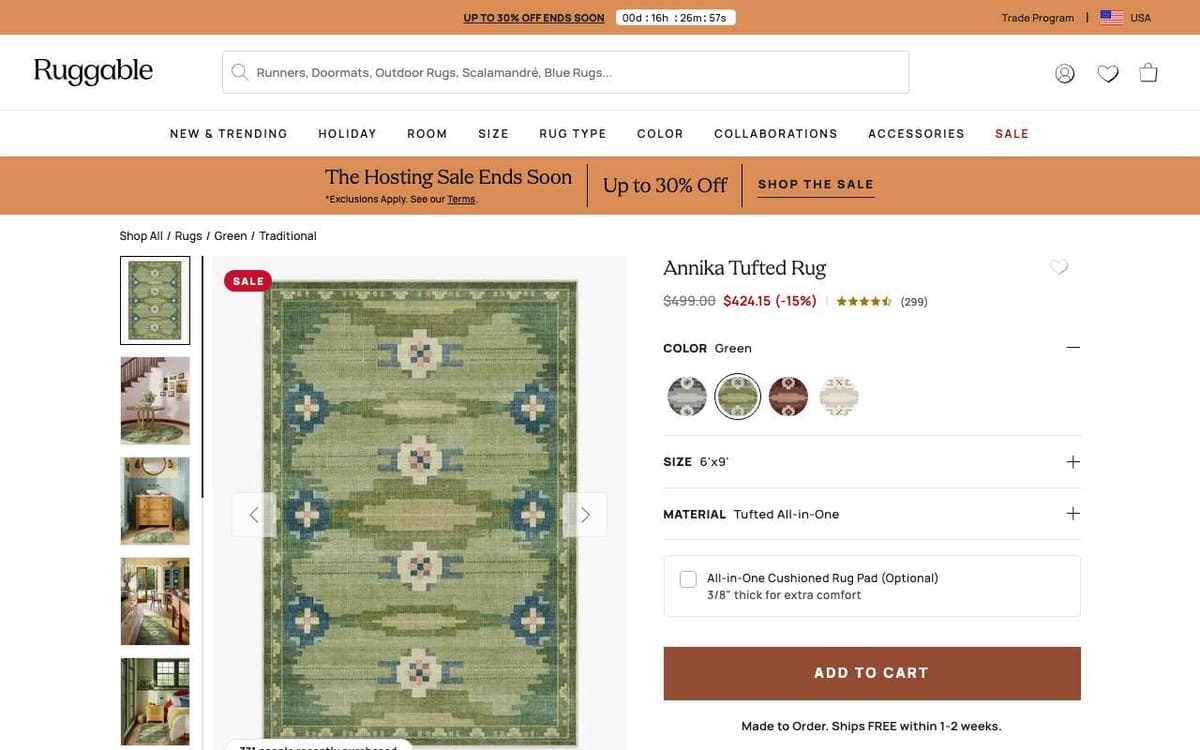
What stands out. Color, size and material as expandable rows, an optional rug pad add-on, and a delivery line under the button.
What you can learn. An add-on checkbox in the buy box sells the accessory without a popup.
What our audit flagged. 30 of 109 tappable elements under 24px on a phone, the "Phone" field again type text, and no Organization markup.
The fix. Enlarge tap targets, set type="tel", and add Organization markup.
Food, drink and kitchen store examples
13. Fishwife
Homepage
What stands out. A product launch as the headline, "Tuna Belly is Here!", one Shop Fishwife button, and a Starter Pack offered in the top bar.
What you can learn. A starter pack is an easy first order for a product people have not tried.
What our audit flagged. A discount quiz popup covered the whole first phone screen on load, and there was no returns wording or policy link.
The fix. Delay the popup until the visitor engages, and state and link the returns policy.
Product page: Gold Label Smoked Salmon
What stands out. The rating is the first thing above the name and scrolls to the reviews when clicked; the price is shown per pack.
What you can learn. A clickable rating gives doubters a shortcut to proof.
What our audit flagged. No guarantee, refund or returns wording, and no link to a returns policy.
The fix. Add one line on what happens if an order arrives damaged, linked to the policy, near the button.
14. Graza
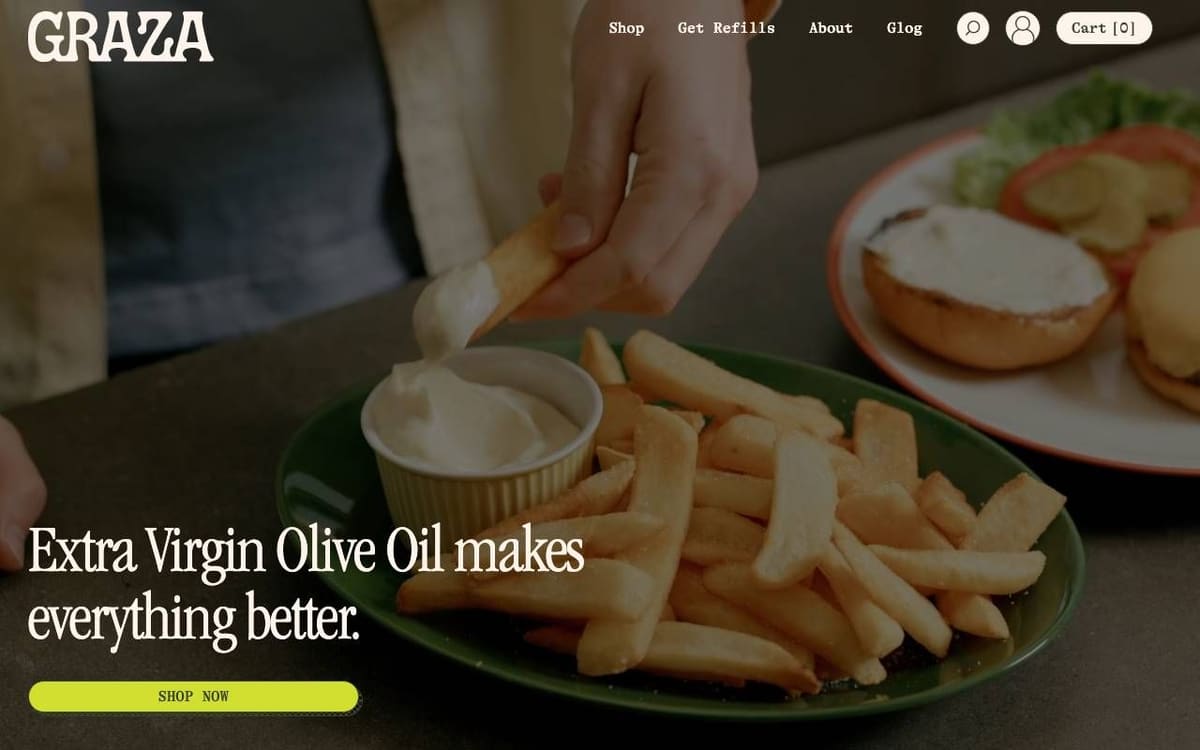
Homepage
What stands out. One photo of the product in use, a headline that names the product, and one Shop Now button. The header offers "Get Refills" as its own route.
What you can learn. Give repeat buyers their own top-level link.
What our audit flagged. No shipping or returns text in the raw HTML or the markup, no returns wording or link on the page, and two H1 headings.
The fix. Add a short shipping and returns summary and hasMerchantReturnPolicy markup, and keep one H1.
Product page: Drizzle
What stands out. Quantity tiers that add a discount and then free shipping as you buy more, and a choice between a one-time purchase and a subscription.
What you can learn. Showing the reward for each extra unit makes the larger order the obvious choice.
What our audit flagged. Again no returns wording or policy link.
The fix. State the returns terms near the button and link the policy.
15. Our Place
Homepage
What stands out. A point of view in the hero, "Non-Toxic By Design", and an announcement bar that spells out the trial, the free shipping threshold and free returns.
What you can learn. Lead with the reason people pick you over the store next door.
What our audit flagged. The "Email Address" field was type text, and eight tap targets were under 24px on a phone.
The fix. Set type="email", and make buttons and links at least 24px, with space between them.
Product page: Wonder Oven Pro
What stands out. A Bestseller badge on the product and a kit with accessories offered next to it.
What you can learn. Offering the kit beside the single item lets buyers choose their own order size.
What our audit flagged. The Organization markup named "SchemaPlus App", a markup app, instead of the business; three tap targets in the top bar were under 24px; and headings jumped from h1 to h6.
The fix. Set the business name in the markup app's settings, enlarge the top bar links, and nest headings in order.
Beauty and personal care store examples
16. Native
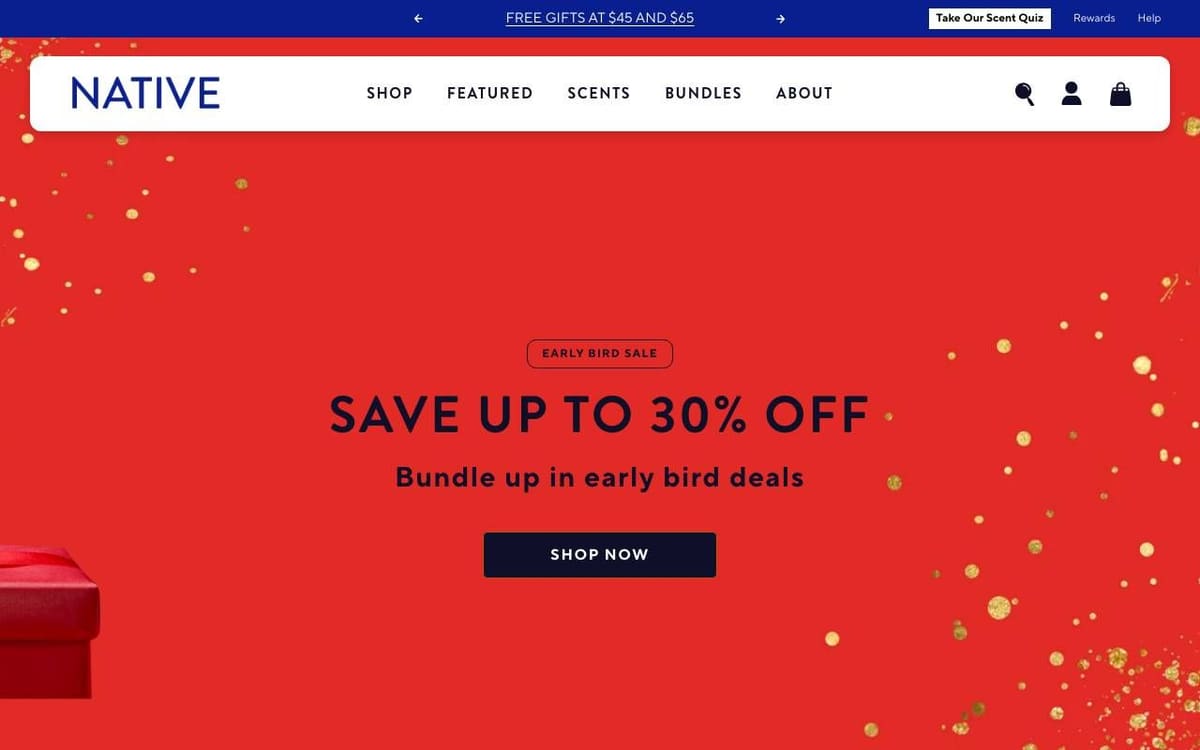
Homepage
What stands out. One sale headline, one line and one button, with a scent quiz offered in the top bar.
What you can learn. A quiz link in the top bar helps when the range is wide but the products look alike.
What our audit flagged. No JSON-LD at all, and no guarantee, refund or returns wording on the page.
The fix. Add Organization, Product and Offer markup, and state the returns terms near the button.
Product page: Deodorant Stick
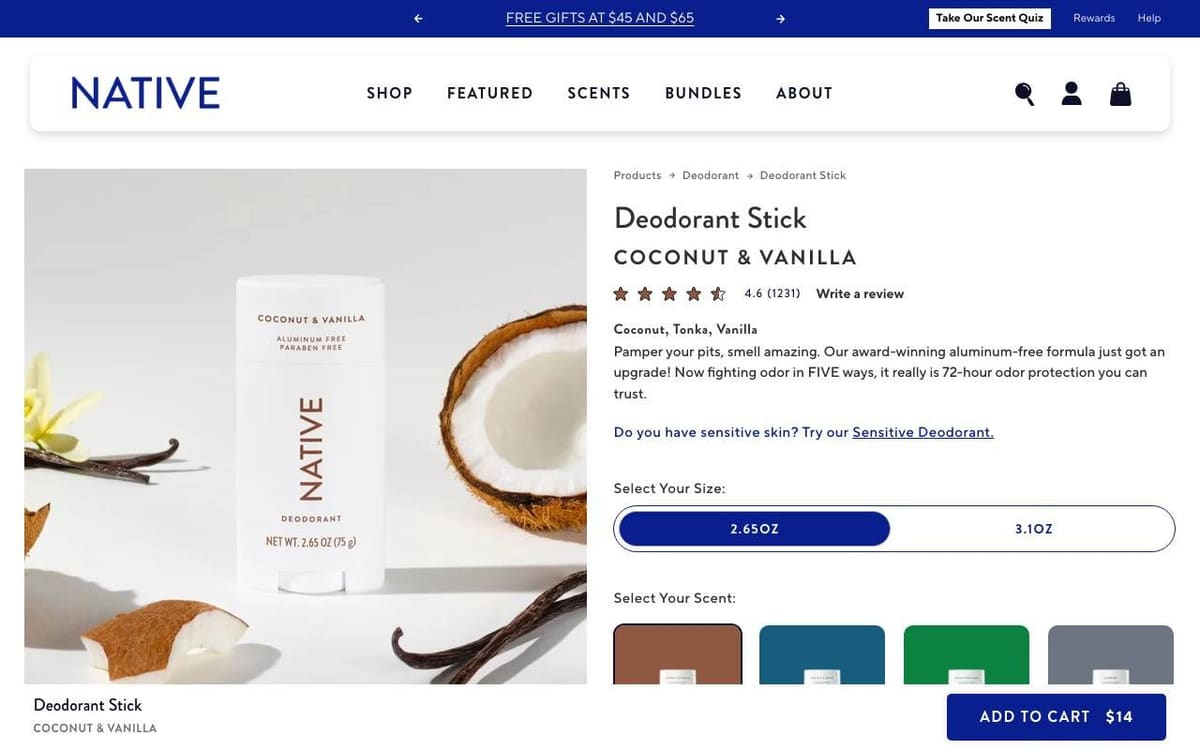
What stands out. Scent as a subtitle, rating, a short description with a link to the sensitive version, and the price on the Add to Cart button.
What you can learn. Point to the alternative product in the description, so the shopper it does not suit does not leave.
What our audit flagged. 9 tap targets under 24px on a phone, including the rating link, 7% of the text under 12px, no returns wording and no Organization markup.
The fix. Enlarge the rating and tab links, raise small print, state the returns terms, and add Organization markup.
17. Olaplex
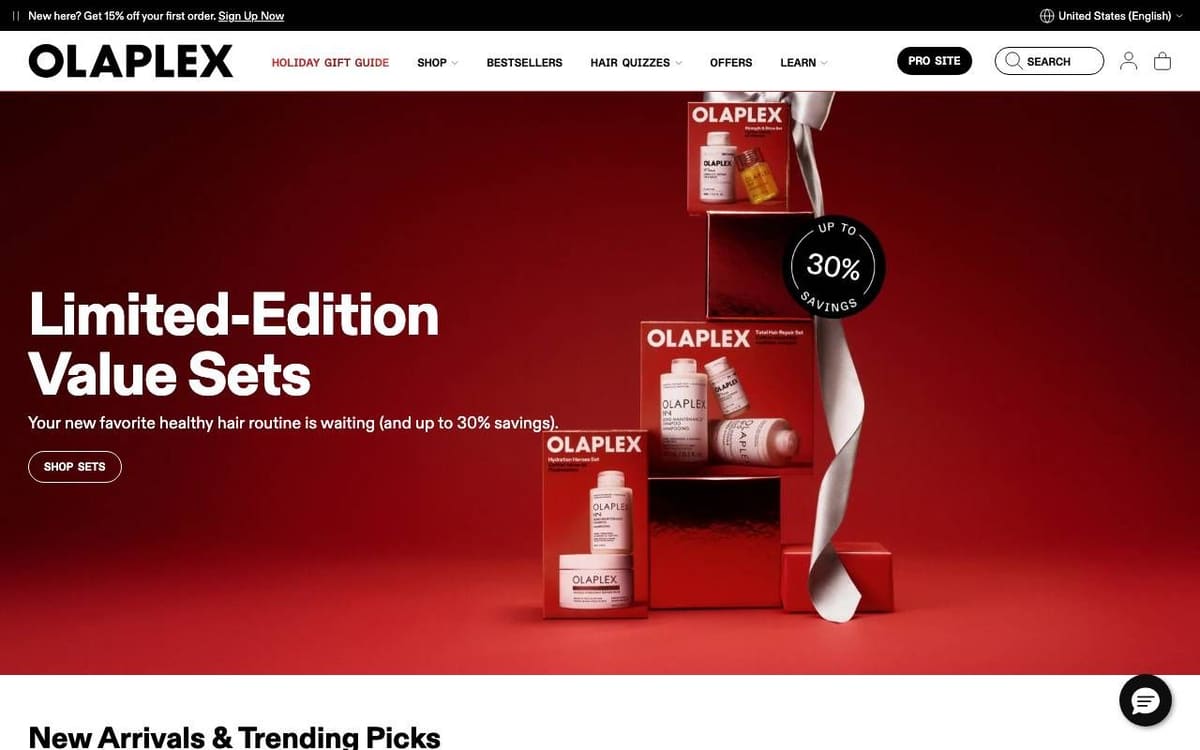
Homepage
What stands out. One offer, one button, a search field, and "Hair Quizzes" in the main menu.
What you can learn. A quiz in the main menu turns "which product is for me" into a guided path.
What our audit flagged. Three H1 headings, no returns wording, and a 66 character title.
The fix. Keep one H1, state the returns terms, and put the topic first in a shorter title.
Product page: No. 3PLUS Complete Repair Treatment
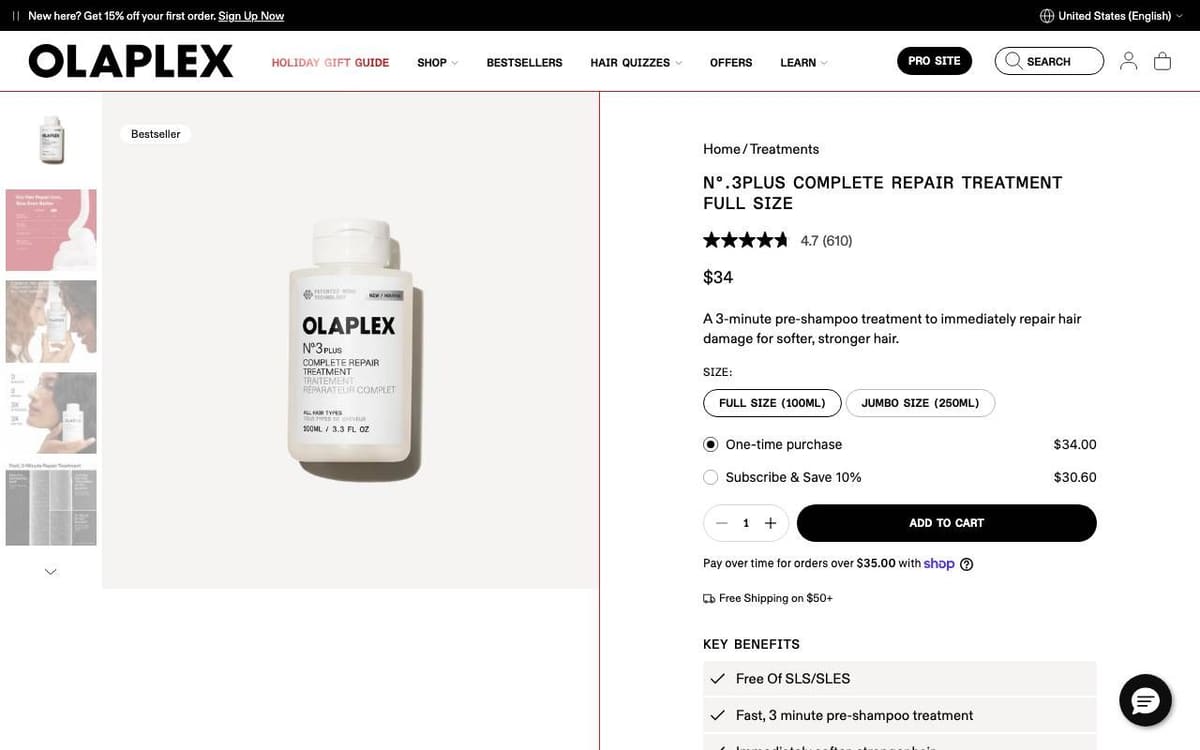
What stands out. One-time or subscribe with the saving shown, quantity, Add to Cart, the free shipping threshold and a Key Benefits list, all on the first screen.
What you can learn. Put the subscription saving in the choice itself, not in a separate banner.
What our audit flagged. 18 tap targets on the first phone screen under 24px, mostly slide dots, no returns wording, and 19 question headings with only 2 short answers.
The fix. Replace slide dots with larger arrows or thumbnails, state the returns terms, and answer each question heading directly.
Accessories, travel and eyewear store examples
18. Away
Homepage
What stands out. The first screen names the collection, makes one claim in large type and offers one button.
What you can learn. A first screen with almost nothing to fix is mostly a first screen with few things on it.
What our audit flagged. Its one finding: review text was on the page, but not on the first screen.
The fix. Add a short rating line near the headline or button. A small test, not a redesign.
Product page: The Carry-On
What stands out. Color swatches, a Personalize button and an Add to Cart button that carries the price.
What you can learn. Personalization next to the add button sells it at the moment of purchase.
What our audit flagged. No guarantee, warranty, refund or returns wording on the page, and five links under 24px on a phone.
The fix. State the warranty and returns terms near the button, and enlarge small links.
19. Ridge
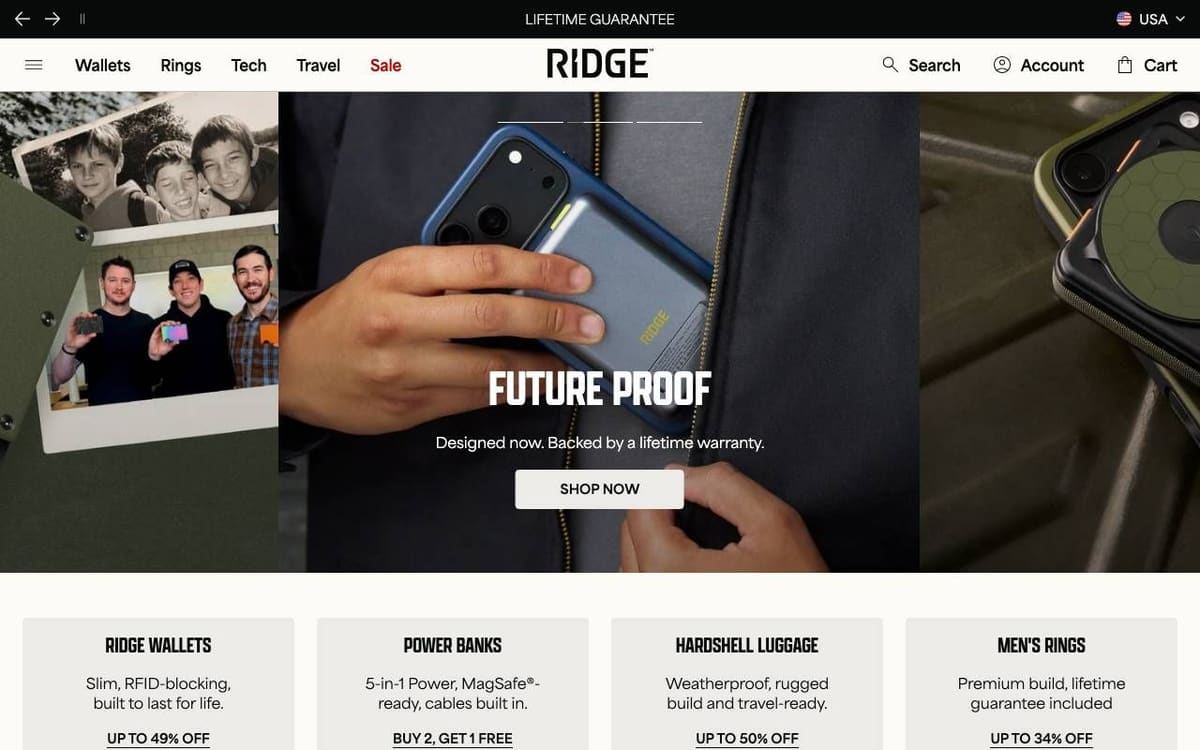
Homepage
What stands out. "Lifetime Guarantee" in the top bar, a headline and one line about the warranty, one button, and four category cards with an offer on each.
What you can learn. If your guarantee is strong, make it the first thing on the page.
What our audit flagged. Six H1 headings, and review text only below the first screen.
The fix. Keep one H1, and add a rating line near the hero button.
Product page: Ridge Wallet
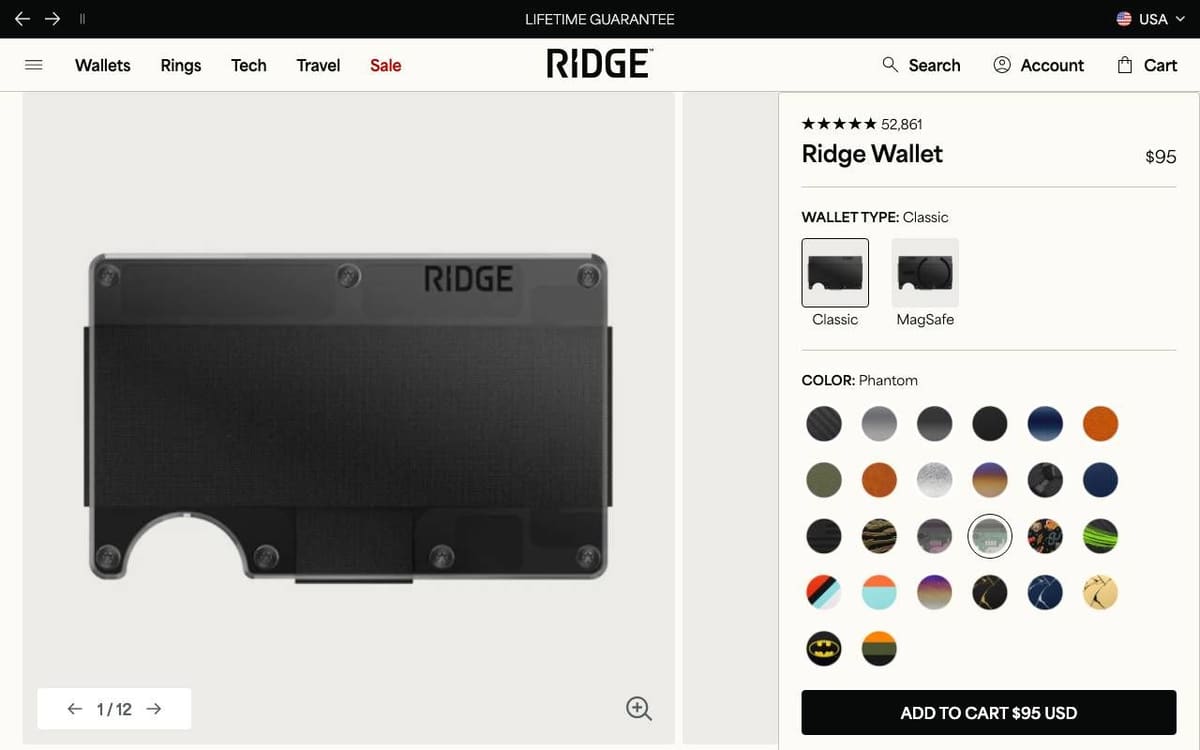
What stands out. Rating, name and price on one line each, wallet type as two pictured choices, and the price repeated on the button.
What you can learn. Pictured choices for the main variant beat a text dropdown.
What our audit flagged. 41 links on the first desktop screen, the one finding we used.
The fix. Group the menu links so the buy box stays the focus.
20. Warby Parker
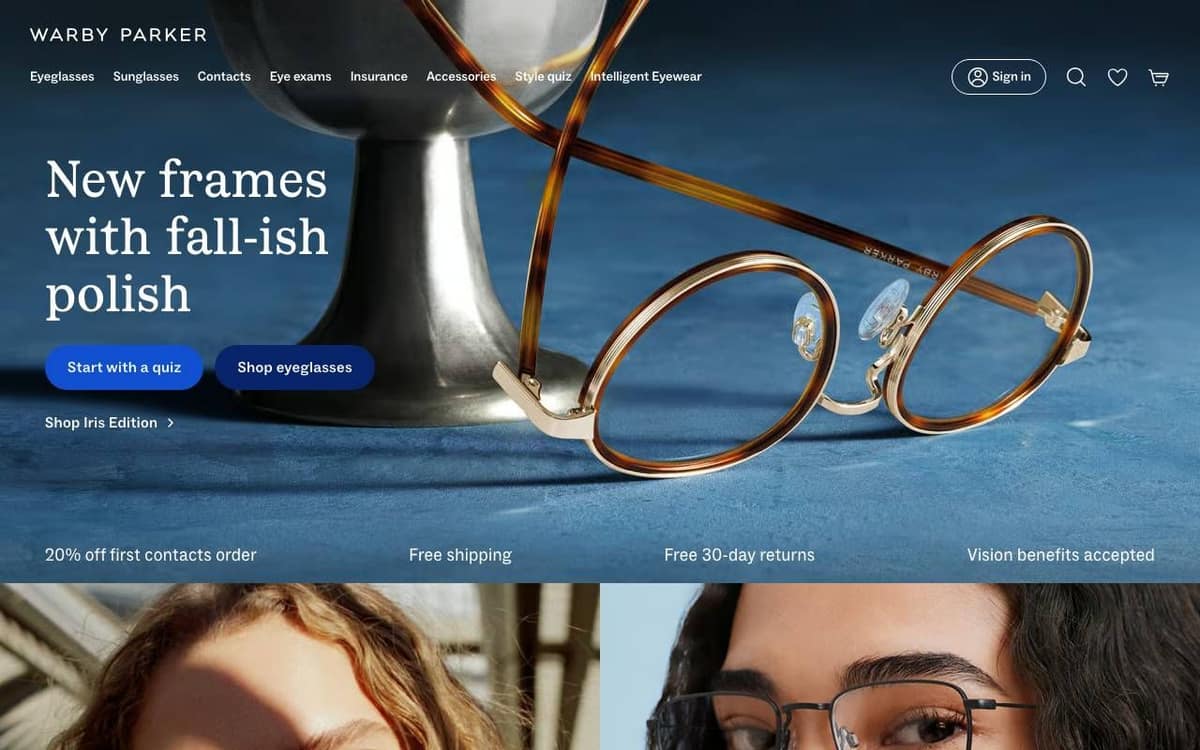
Homepage
What stands out. Two buttons for two kinds of visitor, Start with a quiz and Shop eyeglasses, and a strip listing free shipping, free 30-day returns and vision benefits accepted.
What you can learn. Serve the unsure and the decided with two clearly different buttons.
What our audit flagged. The returns terms were stated, but no link to a returns policy was found, and six color swatches were under 24px on a phone.
The fix. Link the policy next to the stated terms, and enlarge the swatches.
Product page: Daisy eyeglasses
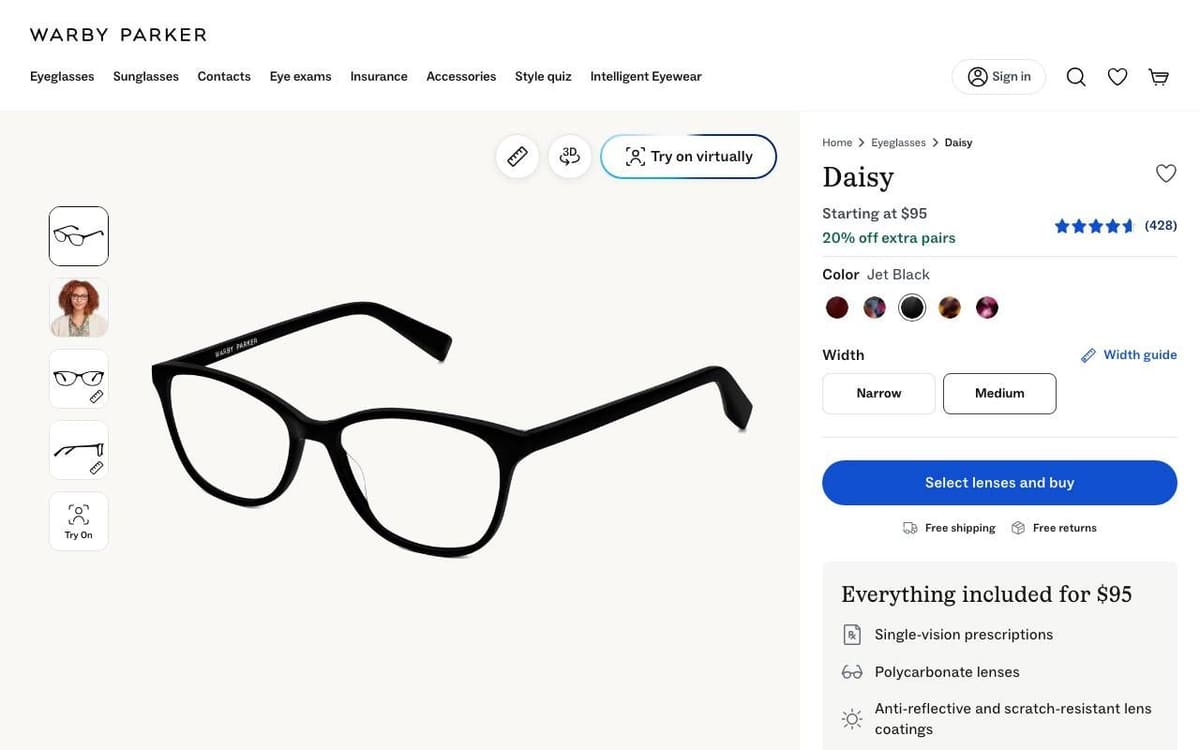
What stands out. A virtual try-on button on the photo, width choices, one blue button, free shipping and returns under it, and a list of everything the price includes.
What you can learn. "Everything included" answers the hidden cost question before the shopper asks it.
What our audit flagged. No Organization markup, and 12 different buttons on the first desktop screen, mostly slide controls. Our phone load got a maintenance page twice, so we did not use this page's phone checks.
The fix. Add Organization markup, and give the slide controls less visual weight than the main button.
Ecommerce website examples at a glance
This table summarizes the 20 ecommerce website examples: the store, its category, the two pages we audited, the finding we picked as most instructive on each page and the fix the audit suggested. Stores are grouped by category, in the same order as the examples below.
| Store | Category | Page | Top finding | Fix |
|---|---|---|---|---|
| Allbirds | Shoes | Homepage | No JSON-LD structured data | Add Organization and Product markup |
| Product page | 8% of the text under 12px on mobile | Raise small print to 14px | ||
| Bombas | Socks and apparel | Homepage | Business name not stated in markup | Add Organization markup and og:site_name |
| Product page | No Organization markup | Add Organization markup | ||
| Quince | Apparel and home | Homepage | No clear headline on the first phone screen | Add one short headline at the top |
| Product page | Email field is not type email | Set type="email" on the field | ||
| Rothy's | Shoes and bags | Homepage | 64 links on the first desktop screen | Trim or group the links near the top |
| Product page | 61 links on the first desktop screen | Trim or group the links near the top | ||
| Cotopaxi | Outdoor gear | Homepage | No clear headline on the first phone screen | Add one short headline at the top |
| Product page | 11% of the text under 12px on mobile | Raise small print to 14px | ||
| Gymshark | Activewear | Homepage | No reviews or ratings found | Show real reviews near the main button |
| Product page | 16 tap targets under 24px on the first phone screen | Make tap targets at least 24px | ||
| Vuori | Activewear | Homepage | No returns or guarantee wording | State the returns terms near the button |
| Product page | A form field with no visible label | Add a visible label | ||
| Brooklinen | Bedding | Homepage | Product markup has no price | Add an Offer with price and currency |
| Product page | Add to Cart below the first phone screen | Bring the button into the first screen | ||
| Burrow | Furniture | Homepage | Popup covers the whole first phone screen | Delay the popup or make it smaller |
| Product page | Business name not stated in markup | Add Organization markup | ||
| Casper | Mattresses | Homepage | 84 links on the first desktop screen | Trim or group the links near the top |
| Product page | 87 links on the first desktop screen | Trim or group the links near the top | ||
| Parachute | Bedding and bath | Homepage | No JSON-LD structured data | Add Organization and Product markup |
| Product page | No meta description | Write one that names the product | ||
| Ruggable | Rugs | Homepage | Price appears only after JavaScript | Render the price on the server |
| Product page | 30 tap targets under 24px on mobile | Make tap targets at least 24px | ||
| Fishwife | Tinned fish | Homepage | Popup covers the whole first phone screen | Delay the popup or make it smaller |
| Product page | No returns wording or policy link | State and link the returns terms | ||
| Graza | Olive oil | Homepage | Shipping and returns not in the HTML | Add a summary and return policy markup |
| Product page | No returns wording or policy link | State and link the returns terms | ||
| Our Place | Cookware | Homepage | Email field is type text | Set type="email" on the field |
| Product page | Organization markup names an app | Name the business in the markup | ||
| Native | Personal care | Homepage | No JSON-LD structured data | Add Organization and Product markup |
| Product page | No returns or guarantee wording | State the returns terms near the button | ||
| Olaplex | Hair care | Homepage | Three H1 headings | Keep one H1 that names the page |
| Product page | 18 tap targets under 24px on the first phone screen | Make tap targets at least 24px | ||
| Away | Luggage | Homepage | Reviews not on the first screen | Add a rating line near the main button |
| Product page | No returns or guarantee wording | State the terms near the button | ||
| Ridge | Wallets and travel | Homepage | Six H1 headings | Keep one H1 that names the page |
| Product page | 41 links on the first desktop screen | Trim or group the links near the top | ||
| Warby Parker | Eyewear | Homepage | No returns policy link | Link the returns policy near the buttons |
| Product page | No Organization markup | Add Organization markup |
How we picked these best ecommerce websites to learn from
These ecommerce website examples are 20 well-known US direct to consumer stores, chosen so the list covers apparel and shoes, outdoor and activewear, home and furniture, food and kitchen, beauty and personal care, and accessories and travel. They are examples to learn from, not a ranking of the best ecommerce websites. For each store we audited two pages: the homepage and one bestselling product page.
Convertica's free CRO audit loads a page on a desktop screen and a phone screen and scores eight checks out of 100: the first screen, calls to action, forms, trust, mobile, speed, agent readiness and search basics. For these examples we used its measured checks only; the AI review step was not run. The first nine homepages were audited on 24 October 2026, everything else on 25 October 2026. Each entry gives what stands out on the page, what you can learn from it, two or three of the most useful findings and the fix the audit gave.
Ten stores were dropped. Huckberry and Hydro Flask showed a bot check instead of the page; Glossier, Liquid Death, Mejuri, Nomad and Peak Design served a regional storefront rather than the US site; Patagonia showed a holding page; Skullcandy's homepage was covered by a ship-to popup; and Everlane priced its pages in a foreign currency. Our test browser was outside the United States, so several stores opened with a ship-to country popup. A US shopper would not see those popups, so we left them out of the findings and the screenshots. We also left out any finding a screenshot contradicted.
Eighteen of the 20 stores load files from Shopify's servers in their page code. Quince and Warby Parker do not, and we could not confirm what they run on. To check a store you admire, the Shopify theme detector names its theme and the Shopify app detector lists the apps its page loads.
All of these are good stores run by capable teams. The findings are what we would test next, not mistakes, and they say nothing about a store's sales. We do not score, rank or compare the stores.
Short answer
Ecommerce website examples teach most when you can see why a page works and what it still gets wrong. These 20 US stores, from Allbirds to Warby Parker, had their homepage and one product page audited by Convertica. The best kept price, rating and the add button together; common gaps were small mobile tap targets and missing markup.
- Every example is a real US store: its homepage and one product page, run through Convertica's free audit's measured checks on 24 and 25 October 2026.
- The strongest product pages put the price, the rating, the variant choice and the add button on the first screen, as Quince, Ridge and Native do.
- On phones, the common gaps were tap targets under 24px, small print and add buttons below the first screen.
- 11 of the 20 product pages had no Organization markup, and Native's and Parachute's homepages had no JSON-LD at all.
- Run the same audit on your own store before copying any of these designs.
Ecommerce website design examples by page type
These ecommerce website design examples, read page type by page type, show where the 20 stores agree and where they differ. Everything here comes from the 40 audits and screenshots above.
Homepage first screen
The homepage first screen works best with one headline that says what is on offer and one or two buttons. Brooklinen, Native, Graza and Away do it with one button; Allbirds and Warby Parker use two, to split shoppers by gender or by how sure they are. Casper and Rothy's show what crowds a first screen: 84 and 64 visible links. Our ecommerce homepage guide and ecommerce navigation guide cover each part.
Product page
The strongest product pages put five things on the first screen: name, rating, price, the variant choice and the add button. Quince, Ridge, Native, Olaplex and Brooklinen all do. Useful extras we saw: a fit note (Allbirds, Rothy's, Vuori), what the set includes (Brooklinen), quantity tiers (Graza), a pack selector (Bombas), an add-on checkbox (Ruggable) and delivery and returns lines under the button (Quince, Warby Parker). See product page optimization for what to test.
On the way to the cart
We did not audit carts or checkouts; these points come from the product pages, the last step before the cart. Away, Native, Parachute and Ridge put the price on the add button, which confirms the total at the click. Casper keeps a bar with Add to cart in view, and Casper and Quince show a pay over time line by the price. The checkout optimization guide covers the steps after the click.
Best mobile ecommerce websites: what the mobile examples do
The best mobile ecommerce websites in this set keep the add button, the price and readable text on the first phone screen. The audit's phone checks found no mobile issues on the homepages of Burrow, Casper, Graza, Native and Olaplex, or on the Burrow and Graza product pages. The phone gaps that came up most often:
- Tap targets under 24px on 10 of the 20 product pages, often slide dots, breadcrumbs or top bar links: Away, Cotopaxi, Gymshark, Native, Olaplex, Our Place, Parachute, Quince, Rothy's and Ruggable.
- Small print. 6 to 11% of the text under 12px on the product pages of Allbirds, Cotopaxi, Native and Quince.
- Add button below the first screen on the Brooklinen and Rothy's product pages, where photos and swatches came first.
- Popups covering the whole first screen on the Burrow, Fishwife and Parachute homepages: an email or discount offer shown on load.
What do these online store examples have in common?
Across these 20 online store examples, the first screens were usually strong: a clear headline, one or two buttons and real category names in the navigation. The gaps sat elsewhere: small tap targets on phones, returns terms not stated, and data that machines read, such as structured data and prices, missing or loading late.
- Machine readable gaps. 11 of the 20 product pages had no Organization markup. Allbirds, Bombas, Native and Parachute had no JSON-LD on the homepage, Brooklinen's Product markup had no price, and Ruggable's homepage prices appeared only after JavaScript ran.
- Returns not said or not linked. The audit found no returns wording on the homepages of Burrow, Fishwife, Graza, Gymshark, Native, Olaplex and Vuori, or on the Away, Fishwife, Graza, Native and Olaplex product pages. Warby Parker stated its terms but did not link the policy.
- More than one H1. Cotopaxi, Graza, Olaplex and Ridge had several H1s on the homepage, and Allbirds and Cotopaxi on the product page.
- Busy first screens. Burrow, Casper, Parachute, Ridge and Rothy's had 27 to 87 links on the first desktop screen of the product page, most of them in the menu.
- Field types. Our Place, Quince and Ruggable each had an email or phone field set to plain text.
These patterns describe these 40 pages on two days. They are a list of things to check on your own store, not a claim about ecommerce websites in general.
How do I start an ecommerce website?
To start an ecommerce website, decide what you sell and to whom, pick a platform, build the four pages every store needs (homepage, category, product and checkout), then set up payments, shipping and returns and audit the store before you buy traffic. The steps below link to our guides for each part.
- Decide what you sell, to whom, and why someone would buy it from you rather than the next store. Every store above leads with that reason.
- Choose a platform and work out its fees; the Shopify fee calculator, Stripe fee calculator and PayPal fee calculator help compare costs.
- Build the homepage and the menu: one headline, one main button, real category names. See the homepage guide and the navigation guide.
- Build product pages with name, rating, price, variants and the add button on the first screen (product page optimization).
- Write your shipping and returns terms and show them near the button and in the footer.
- Set up a short checkout (checkout guide).
- Add Organization, Product and Offer markup with prices in the HTML; the agent readiness checklist lists the rest.
- Check every page on a phone, run the free CRO audit, and track the ecommerce metrics that show whether changes work.
How to apply these examples to your own store
To use these ecommerce website examples on your own store, audit your own pages first, then compare your findings with the patterns above, fix the high impact items and test the changes. Copying another store's design without knowing your own page's problems tends to move the wrong things.
- Run your homepage and your best selling product page through the free CRO audit, and note every high and medium impact finding.
- Check your first screen on a phone: one headline that says what you sell, one main button, and on product pages the price and add button in view.
- State delivery and returns terms in plain words near the button, and link the full policy.
- Make every button and link at least 24px, and set email and phone fields to the right input type.
- Find out which theme and apps a store you admire uses with the Shopify theme detector and the Shopify app detector before you try to copy a layout.
- Test the changes on your own traffic, judging them on orders and revenue per visitor.
For product and landing pages, our anatomy of a landing page walks through each part in order, and the CRO case studies show tested changes on real stores with their results and sources.
Related guides
Questions about ecommerce website examples
What is a good example of an ecommerce website?
A good ecommerce website example states what it sells on the first screen, puts price, rating and the add button together on the product page, shows delivery and returns terms, and works well on a phone. Quince, Ridge, Native and Warby Parker each do several of those things well on this page, and each still had something worth testing.
How were these ecommerce website examples chosen?
We picked well-known US direct to consumer stores across apparel, outdoor, home, food, beauty and accessories. We ran each homepage and one bestselling product page through Convertica's free CRO audit on 24 and 25 October 2026. Stores that blocked the audit, served a regional storefront or showed only a holding page were dropped.
What are the top 10 ecommerce websites?
This page does not rank stores by size or sales. Lists of the biggest ecommerce websites come from market research firms that estimate retail sales and from traffic panels that estimate visits, and their methods differ. The 20 stores here were picked to learn from, because each shows a pattern worth copying or fixing.
What is the most used ecommerce site?
Which ecommerce site is most used depends on the measure, such as sales, orders, visits or app users, and on the country. Market research firms and traffic panels publish those estimates. This page does not measure use; it shows 20 stores you can learn design and conversion patterns from, with what our audit found on each.
What are the types of ecommerce?
The main types of ecommerce are business to consumer (B2C), business to business (B2B), direct to consumer (D2C), consumer to consumer (C2C), consumer to business (C2B) and business to government (B2G). Stores also differ by model: single brand stores, marketplaces, subscriptions and dropshipping. Every store on this page is a D2C brand.
How do I start an ecommerce website?
To start an ecommerce website, decide what you sell and to whom, choose a platform, then build the homepage, navigation, product pages and checkout. Set up payments, shipping and a returns policy, add Product and Organization markup, test the store on a phone, and audit it before you spend on traffic.
What do the best ecommerce websites have in common?
Among the 20 stores we audited, the strongest pages put one clear headline and button on the homepage's first screen and kept price, rating, variant choice and the add button together on the product page. The most common gaps were small tap targets on phones, missing Organization markup and returns terms that were not stated.
Are these stores Convertica clients?
No. These stores were picked as well-known public examples. They are not Convertica clients and are not affiliated with or endorsing Convertica. The findings come from one automated check of each page on 24 or 25 October 2026, and a brand can ask us to update or remove its entry.
How can I audit my own ecommerce website?
Run your homepage and your best selling product page through Convertica's free CRO audit. It loads each page on desktop and mobile, scores eight checks out of 100 and lists every finding with its evidence and a fix. Then fix the high impact findings first and test the changes on your own traffic.
