CRO guide
Mobile conversion optimization: how to make phones convert
A responsive site is not the same as a site optimized for phones. Mobile conversion optimization starts from how people actually use a phone: one hand, short bursts, small screen, slow typing, less trust. This guide shows how to measure your mobile gap and the 12 steps that close it.
Short answer
Mobile conversion optimization is the work of raising the share of phone visitors who buy, sign up or get in touch. It goes further than responsive design: it measures how phone visitors behave, finds the step where they drop out, and changes pages for one-handed use, small screens, slow typing and slower connections.
- A responsive site fits the screen, but an optimized one puts what a phone visitor needs first on the first screen.
- Compare conversion rate and each funnel step by device to find where phones fall behind desktop.
- Keep the main buttons within thumb reach, make tap targets large, and cut typing with autocomplete and the right keyboards.
- Show trust beside the button, and let people save their cart and finish later on another device.
- Read every A/B test result by device, because a change that wins on desktop can lose on mobile.
What is mobile conversion optimization?
Mobile conversion optimization, or mobile conversion optimisation in British spelling, is the work of raising the share of phone visitors who buy, sign up or get in touch. It is not the same as responsive design. A responsive site fits the screen; an optimized one is built around how people use a phone: one hand, short bursts, a small screen and slow typing.
The most common mistake is to treat the mobile site as a squashed version of the desktop site, with every element stacked into one long column. It can look fine and still sell poorly, because the things a phone visitor needs first end up several screens down.
Why do mobile visitors convert less than desktop visitors?
Mobile visitors usually convert less than desktop visitors because of how and where phones are used. People browse on the move, between other things, with less patience. The screen shows less, typing is slow, connections can be slower, and some people trust paying on a phone less. Many also research on a phone and buy later on a computer.
Three differences in the visitor shape everything else:
- They are usually doing something else. On a commute, in a queue, on the sofa with the television on. Get to the point; a phone visitor scans even faster than a desktop one.
- They have less patience. Make things easy to find, compare and read without pinching and zooming. Deliver what the visitor wants from the page at the moment they want it.
- They trust the device less for paying. Show security, returns and guarantees near the button, and offer payment methods that avoid typing card numbers.
Some of the gap is behavior you cannot change, such as people choosing to finish on a computer. Much of it is design you can change. The work is telling the two apart, which starts with measurement.
How to measure your mobile conversion gap
To measure your mobile conversion gap, compare conversion rate by device in your analytics, then build a funnel split by device to see at which step phones fall behind. Check the busiest mobile landing pages one by one, test them on a real phone, and measure their speed against Google's Core Web Vitals.
-
Compare conversion rate by device
In Google Analytics 4, add device category to a report that shows sessions and key events. Note the conversion rate on mobile, desktop and tablet for the same dates and traffic sources.
-
Find the step where phones fall behind
Build a funnel exploration with your main steps (for a store: product view, add to cart, begin checkout, purchase) and break it down by device. The step where the mobile drop is much steeper than desktop is your first target.
-
List the busiest mobile landing pages
Sort landing pages by mobile sessions and compare their engagement and conversion rates with the same pages on desktop. A large gap on a busy page is worth more than a small one on a quiet page.
-
Use the pages on a real phone
Open each page on a mid-range phone on mobile data, one-handed. Try to complete the conversion. Write down every moment you have to zoom, scroll back, retype or hunt for something.
-
Measure speed against Core Web Vitals
Google's Core Web Vitals set targets for a good experience: Largest Contentful Paint within 2.5 seconds, Interaction to Next Paint of 200 milliseconds or less, and Cumulative Layout Shift of 0.1 or less, measured at the 75th percentile of page loads and segmented across mobile and desktop. PageSpeed Insights reports all three.
-
Watch phone sessions
Filter session recordings to mobile visitors who left at your weakest step. Look for repeated taps, rage taps on things that are not links, and long pauses on forms.
A high mobile bounce rate on landing pages is often the first sign of a mobile problem. The bounce rate guide explains how to read it by device.
Mobile conversion optimization in 12 steps
Mobile conversion optimization comes down to twelve steps: give each page one goal, put what matters on the first screen, design for thumbs, make targets easy to tap, let each page do its own job, make search work hard, cut typing, speed pages up, simplify checkout, show trust near the button, keep pop-ups out of the way and let people finish later.
-
Give every page one goal
Phone visitors arrive with one purpose and little patience for anything else. Decide the one thing each page is for, and judge every element on whether it moves the visitor toward it. If you cannot name the goal of a page, that is the first finding.
-
Put what matters on the first screen
Bring the elements that lead to the page's goal to the top. On a lead generation page, show the form or its first step. On a product page, the name, image, price, availability and add to cart button. On an article, a link to the next useful step. Time-sensitive information, such as the last order date for delivery before a holiday, belongs here too.
-
Design for thumbs
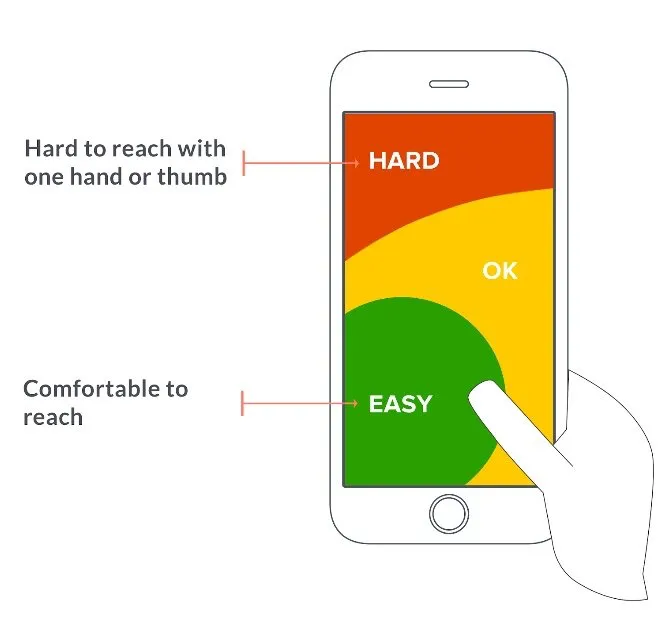
Many people hold a phone in one hand and tap with a thumb, which reaches the bottom and middle of the screen more easily than the top corners. Keep the main buttons and controls in easy reach, and consider a sticky call to action at the bottom of long pages so visitors never have to scroll back to find it.
-
Make targets easy to tap
WCAG 2.2, the web accessibility standard, sets a minimum target size of 24 by 24 CSS pixels at level AA, with exceptions such as enough spacing around smaller targets, and 44 by 44 CSS pixels at the stricter level AAA. Use the larger size for buttons that lead to a conversion, and leave space between links so people do not hit the wrong one.
-
Let each page do its own job
The homepage qualifies visitors and points them to the right section; it is not the place to ask for too much too soon. Category pages need clear names a first-time visitor understands and products visible without much scrolling. Product pages reassure the buyer they will not regret the decision.
-
Make search work hard
On a phone, search is often the quickest way to a product. It should cope with common misspellings, suggest results as people type, and push out of stock items to the bottom of the results. The guide to ecommerce site navigation covers menus and search together.
-
Cut the typing
Every field is harder on a phone. Remove fields you do not need, set the right input types so the correct keyboard appears (email, phone, numbers), turn on autocomplete so browsers can fill in names and addresses, and use address lookup. Never clear a form because one field failed.
-
Speed the page up
Compress and size images for phones, remove sliders and scripts the page does not need, and stop the layout jumping as it loads. Check against the Core Web Vitals targets above, on mobile, not only on desktop.
-
Simplify checkout
Offer guest checkout, the mobile wallets your customers use, and a clear total with delivery costs before the last step. The cart abandonment guide covers checkout drop-off in detail.
-
Show trust beside the button
Because some people trust paying on a phone less, put security information, the returns policy and reviews where the decision is made. On a small screen, a footer link is out of sight.
-
Keep pop-ups out of the way
An overlay that is a small box on desktop can cover the whole screen on a phone. Do not show pop-ups on arrival, make any you keep easy to close, and check cookie banners and chat widgets do not cover the main button.
-
Let people finish later
Some visitors will always prefer to complete a purchase on a computer. Keep them: save carts between visits and devices, let shoppers email themselves their cart or a quote, and make it easy to pick up where they left off.
A mobile example: the thumb zone
When Convertica rebuilt the Empire Flippers valuation tool as a step-by-step flow, the first split-URL test showed the new version converting better on desktop than on mobile. Form analytics segmented by device explained why: on the new variation, several important controls sat near the top of the screen, which is hard to reach with a thumb on a phone held in one hand.
The follow-up change moved the important controls into the easy-to-reach area, so the whole flow could be completed with one thumb. The original case study reports about 10% more conversions from that mobile change, without saying over what period, so treat that figure as reported rather than verified. The lesson holds either way: segment by device, and let what one test shows about phones become the brief for the next.
36% vs 26%
Conversions on the new variation, desktop vs mobile, first split-URL test
What Convertica's mobile tests show
Convertica's published case studies include several tests where phones and desktops reacted differently to the same change, which is the strongest argument for reading every result by device.
- A sticky call to action. An online store's landing page kept its call to action on screen at all times in a bar at the bottom. On mobile, the rate of order completion rose sharply; on desktop, nothing changed, so the bar went live on mobile only. Read the sticky CTA case study.
- A swipeable pricing table. A supplement store stacked its product packages one below the other on mobile, so comparing them meant a lot of scrolling. Turning the table into a slider raised mobile revenue per visitor 36% and the mobile rate of order completion 43.9%, at 98% confidence. The case study does not state the test length. Read the mobile pricing table case study.
- Changes that only worked on desktop. A free shipping threshold message on product pages and shipping and refund policy badges on a cart page both lifted desktop results, with no significant change on mobile. Read the free shipping case study.
+252.9%
Rate of order completion on mobile, 20-day test
Source: Sticky CTA test, mobile visitors, 20 days, 98% confidence
What a mobile product page needs
A mobile product page needs the product name, image, price, availability and add to cart button on the first screen, followed by a short description, delivery and returns information, ways to pay, reviews and an easy way to compare. Everything else comes after. Use this checklist on your best-selling product pages first.
- Name, main image, price, stock status and add to cart visible without scrolling
- Images that can be swiped and zoomed without leaving the page
- Size, color or variant choices that are easy to tap and show what is in stock
- Delivery cost and an expected delivery date near the button
- Returns policy and security information near the button, not only in the footer
- A short description first, with full details in sections people can open
- Reviews that are easy to reach and read on a small screen
- A way to compare with similar products without starting again
- Payment methods shown, including the wallets your customers use
- No pop-up or widget covering the add to cart button
How to make forms easier on a phone
Forms are where phones lose the most people, because every character has to be typed with a thumb. Two HTML settings remove much of that work: the input type or inputmode, which brings up the right keyboard, and the autocomplete value, which lets the browser fill in details it already knows. Both are free to add and invisible to the visitor until they help.
| Field | Input setting | Autocomplete value |
|---|---|---|
| Full name | type="text" | name |
type="email" | email | |
| Phone | type="tel" | tel |
| Street address | type="text" | address-line1 |
| ZIP or postal code | type="text" (add inputmode="numeric" only where codes are all digits) | postal-code |
| Card number | type="text" with inputmode="numeric" | cc-number |
| One-time code | type="text" with inputmode="numeric" | one-time-code |
Beyond the settings: put labels above fields rather than inside them, show errors next to the field as soon as it is left, keep one column, and ask only for what you need now. The guide to reducing form abandonment goes further.
How to A/B test for mobile conversions
To A/B test for mobile conversions, read every test result by device, and run mobile-only tests for changes that only make sense on a phone. A change that wins on desktop can lose on mobile, and a sitewide result can hide both. Plan each test with enough mobile visitors to give a reliable answer.
- Segment every result. Report the winner for mobile and desktop separately before rolling anything out.
- Test mobile-specific ideas on mobile only. A sticky add to cart bar or a thumb-friendly layout has no desktop equivalent.
- Check the sample size for the segment. If you plan to read mobile on its own, mobile traffic alone must be enough. The A/B test sample size calculator shows how many visitors you need.
- Read the result honestly. The statistical significance calculator tells you whether a difference is likely to be real.
- Judge on the final conversion. More taps on a button is not more orders. Use revenue per visitor or completed leads.
Common mobile conversion optimization mistakes
The most common mobile conversion optimization mistakes come from designing on a desktop screen and checking the phone version last. These are the ones that cost the most:
- Judging the mobile site on a large monitor. Use a real, mid-range phone on mobile data, one-handed.
- Hiding the navigation and the search. A menu icon alone can work, but people must be able to find search and the main categories without guessing.
- Long product descriptions before the button. Put the buying information first and the detail in sections people can open.
- Image carousels and autoplay video at the top. They slow the page and push the offer down.
- Pop-ups on arrival. On a small screen they cover everything, including the reason the visitor came.
- Reading tests only in total. A sitewide winner can be a mobile loser. Read results by device.
- Forgetting tablets and in-app browsers. Visitors who tap a link in a social or email app open your site inside that app, often with less screen space and no saved details.
Mobile pages, search and AI agents
Google says it uses the mobile version of a site's content, crawled with its smartphone agent, for indexing and ranking, which it calls mobile-first indexing. So when you shorten a page for phones, move information into sections people can open rather than deleting it. Content that is missing from the mobile page may be missing from search.
The same applies to AI agents, the assistants that can read and act on a site for the person they work for. They read the page's HTML, not its layout. Prices, availability, delivery terms and returns policies should be in that HTML as plain text, not only in images or loaded later by scripts. Agent readiness is one of the eight checks in Convertica's free CRO audit.
Mobile conversion optimization checklist
Use this mobile conversion optimization checklist for a first pass on your busiest pages. Each line is a yes or no question; every no is a finding to fix or test.
- Conversion rate and each funnel step are measured by device
- Each page has one goal, and its button is visible on the first screen
- Main controls sit within easy thumb reach; long pages have a sticky call to action
- Buttons and links are large enough and spaced apart
- Search copes with misspellings and suggests results
- Forms use the right keyboards, autocomplete and as few fields as possible
- Pages meet the Core Web Vitals targets on mobile
- Checkout offers guest checkout and mobile wallets, with costs shown early
- Trust and returns information sits near the button
- No pop-up, banner or widget covers the main action
- Carts are saved, and visitors can send themselves their cart
- Mobile pages carry the same important content as desktop pages
Mobile conversion questions
What is mobile conversion optimization?
Mobile conversion optimization is the work of raising the share of phone visitors who buy, sign up or get in touch. It goes beyond responsive design: it measures how phone visitors behave, finds where they drop out, and changes pages for one-handed use, small screens, slow typing and mobile connections.
What are CTR and CVR?
CTR, click-through rate, is clicks divided by impressions: how often people who see a link, ad or email click it. CVR, conversion rate, is conversions divided by visitors or clicks: how often people who arrive take the action you want. A high CTR with a low CVR often points to a page that does not deliver what the link promised. On mobile, compare both by device.
Why is my mobile conversion rate lower than desktop?
Phone visitors often browse in short bursts and finish purchases later on a computer. On top of that, small screens hide information, typing is slow, pages load on slower connections, tap targets can be hard to hit, and some people trust paying on a phone less. Your own funnel, split by device, shows which of these applies.
How do I improve my mobile conversion rate?
Measure conversion rate and each funnel step by device first. Then give each page one goal, put the most important information and button on the first screen, keep controls within thumb reach, cut typing with autofill and the right keyboards, speed up pages, offer mobile wallets, and test changes on mobile traffic separately.
How big should tap targets be on mobile?
WCAG 2.2, the web accessibility standard, sets a minimum of 24 by 24 CSS pixels for pointer targets at level AA, with exceptions such as enough spacing around smaller targets. Its stricter level AAA criterion asks for 44 by 44 CSS pixels. For buttons that lead to a conversion, the larger size is the safer choice.
Is a responsive website enough for mobile conversions?
No. A responsive site fits the screen, but often by stacking the desktop page into one long column, which pushes the key information and the main button far down. Mobile conversion optimization decides what a phone visitor needs first and reorders, shortens or rewrites the page for that.
Should I A/B test mobile and desktop separately?
Usually yes, or at least read results by device. A change that wins on desktop can lose on mobile, and the reverse. If mobile is most of your traffic, a mobile-only test often reaches a reliable result sooner. Check your traffic with a sample size calculator before you start.
Does page speed affect mobile conversions?
Slow pages lose visitors before they see the offer, and phones often load pages over slower connections than desktops. Google's Core Web Vitals give measurable targets for loading, responsiveness and layout stability, assessed at the 75th percentile of page loads, segmented across mobile and desktop.
